NEW Malicious Uploads Detection

Stop Attacks Before
They Reach Your App.
On Your Server.
Under Your Control.

WAFio protects your web applications and servers with multi-layer security that runs entirely on your infrastructure. No third-party cloud, no subscription fees, no vendor dependency — just full control over your security stack, deployed in minutes.

Explore the threat simulator
Self-hosted Local inspection Centralized policies
WAFio in actionWatch on YouTube

EXPLORE THE DEFENSE PATH

Follow an attack.
See where policy responds.

Switch between network, application, and runtime scenarios. Follow the signal through each layer and see how different controls respond.

Multi-Layer Threat Simulator

INTERACTIVE
INBOUND TARGET: L7 WAFSIMULATED ATTACK VECTOR
GET /api/users?id=1' UNION SELECT username, password_hash FROM admin--
L3/L4 eBPF

Network driver

Kernel XDP / TC hooks

TCP traffic passes the configured network rules.

PASS
L7 WAF

Application inspection

Semantic engines · CRS · upload hashes

SQL injection signals exceed the example block threshold.

BLOCK 403
RUNTIME

Host kernel

eBPF kprobes / tracepoints

The rejected request does not reach application code.

STANDBY
Illustrative anomaly score185 / 150
Request blocked

Illustrative scenarios, not live traffic or performance measurements. Real results depend on policy, payload, database coverage, and deployment.

FROM TERMINAL TO PROTECTION

Deploy it your way.

Start with a single server or deploy the control plane, WAF agents, and host agents separately. Choose a component to get its installation command.

terminal ~ self-hosted deploymentLINUX
curl -fsSL https://wafio.cloud/install.sh | sudo bash

Review prerequisites and installer options in the installation guide ↗.

20Semantic engines
<5msWAF p99 engineering target*
CRS v4OWASP rule-based inspection
100%Self-hosted deployment

*Latency is a design target, not a benchmark guarantee. Measure with your policies and traffic.

BUILT FOR PEOPLE WHO OWN THEIR STACK

For the teams
behind the infrastructure.

Whether you operate client applications, investigate attacks, or keep production running, WAFio brings security controls into your own environment.

01 / YOUR TEAM

Freelancers & Consultants

Manage protection for multiple clients without putting every application in the same project. Deploy WAFio alongside client workloads and use one control plane to coordinate access, configuration, and agents.

  • Manage client projects from one dashboard
  • Separate project membership and credentials
  • Self-host on infrastructure each client controls
02 / YOUR TEAM

Security Engineers

Work with semantic inspection, OWASP CRS, upload hash verification, and kernel telemetry in one platform. Investigate the evidence behind a decision and tune sensitivity to the application you are protecting.

  • Inspect matched rules and decision context
  • Tune sensitivity and per-project policies
  • Investigate syscall and process activity
03 / YOUR TEAM

DevOps & Sysadmins

Deploy the control plane and agents with the installer, manage services through systemd, and distribute configuration over gRPC. Run on supported Linux servers, virtual machines, or bare metal without requiring a Kubernetes operator.

  • Choose all-in-one or separate agent deployment
  • Reload supported WAF agents without dropping listeners
  • Linux eBPF requires kernel support and BTF

ONE PLATFORM. A BROADER VIEW.

Connected protection.
From request to runtime.

Bring application, upload, network, and host security together. Configure centrally. Enforce where your workloads run.

01 / APPLICATION

Understand the attack. Protect the app.

Semantic analysis and OWASP CRS help identify malicious HTTP requests. Set enforcement policies for the needs of each application.

  • Semantic analysis
  • OWASP CRS
  • Per-project policies
Explore Semantic WAF
02 / FILE UPLOADS

Stop known malware at the upload.

Inspect complete files locally. Confirm malware hash matches with exact SHA-256 verification, and choose how incomplete scans are handled.

  • Exact hash matching
  • Local inspection
  • Configurable enforcement
Explore Malicious Uploads Detection
03 / NETWORK

Enforce policy at the network layer.

Apply network rules with Linux XDP and TC. Manage IP policies and observe enforcement alongside your application security events.

  • XDP / TC
  • IP policies
  • Network visibility
Explore eBPF Firewall
04 / RUNTIME

See what happens beyond the request.

Trace host activity, enrich events with container context, and apply detection rules to investigate suspicious process behavior.

  • Process tracing
  • Container context
  • Detection rules
Explore Runtime Security

FEATURE SPOTLIGHT / FILE UPLOADS

Known malware.
Stopped before your app.

Check files against malware hashes without sending the uploaded content to an external analysis service.

  1. 01

    Inspect locally

    The WAF agent hashes complete files within your configured scan budget.

  2. 02

    Verify the exact hash

    Bloom candidates require an exact SHA-256 match before a malware verdict.

  3. 03

    Apply your policy

    Block confirmed matches or log them. Choose whether incomplete scans should continue.

Set up upload protection
Local file inspectionConcept visualization

Know the scope: unknown or modified malware may not match. Archives are not unpacked. A missing feed can leave only the EICAR test signature available.

INTERACTIVE POLICY EXAMPLE

See what happens to an upload.

Illustration · no files uploaded
BLOCKED · 403

Exact malware hash confirmed

Block mode rejects the upload after an exact SHA-256 match, not a Bloom candidate alone.

Other WAF rules and application validation still apply.

YOUR STACK. YOUR CONTROL.

One control plane.
Protection at the edge.

Keep inspection close to your applications. Use the control plane to manage agents, distribute configuration, and investigate security events.

01 / MANAGE

Control plane

Define project policies, manage access, and connect threat intelligence providers from one dashboard.

Explore the dashboard
02 / CONNECT

Authenticated agents

Provision client certificates and deliver configuration over gRPC with mutual TLS.

Connect your agents
03 / PROTECT

Local enforcement

WAF agents inspect requests. Linux host agents enforce network policy and report runtime activity.

Read the architecture
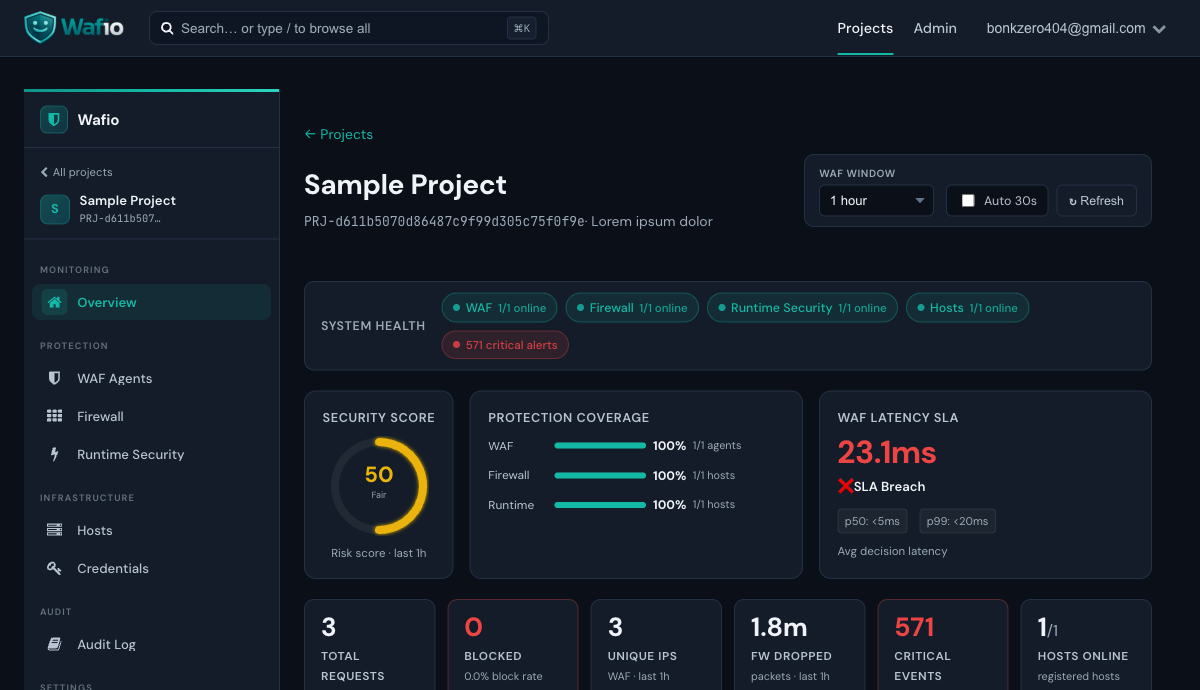
WAFio control plane · product interfaceExplore demo ↗
WAFio control plane dashboard showing application security events and agent activity

HOW IT WORKS / THREE SECURITY LAYERS

Every layer has a job.
Understand the whole path.

Network filtering, HTTP inspection, and host tracing address different signals. Follow each pipeline from observation to its policy response.

L3 / L4

eBPF Network Firewall

Apply packet policy close to the network interface, before allowed traffic continues toward application inspection.

Read the technical guide ↗
  1. 01

    Packet arrives at the interface

    The XDP program inspects inbound packets at its attachment point. Native driver mode can act before the normal socket-buffer path; attachment mode and driver support determine exactly where the program runs.

  2. 02

    BPF map rule lookup

    The program consults kernel maps for configured address, protocol, port, and rate policies. The host agent receives control-plane configuration and updates the enforcement maps, keeping packet decisions local to the host.

  3. 03

    Kernel drop or pass

    Matching deny rules can produce XDP_DROP. Allowed traffic continues with XDP_PASS through the network stack. TC hooks provide additional traffic-control attachment points for network enforcement.

L7 WAF

Web Application Firewall

Inspect HTTP requests in the reverse proxy and apply the policy for the application behind it.

Read the technical guide ↗
  1. 01

    HTTP request intercepted

    Route application traffic through the WAF agent. The reverse proxy applies body limits, flood controls, block policies, geoblocking, bot checks, and configured path rules before later inspection stages. Your application does not need a language-specific SDK.

  2. 02

    Semantic, CRS & upload analysis

    Semantic engines inspect attack structures across SQL, XSS, commands, PHP, Python, LFI, SSRF, Java, LDAP, NoSQL, prototype pollution, SSTI, XXE, deserialization, redirects, prompt injection, header injection, GraphQL abuse, JWT header attacks, and anomalies. Coraza/OWASP CRS adds rule-based signals; configured clean-result suppression controls unnecessary CRS scoring. Upload scanning separately verifies complete-file hashes.

  3. 03

    Score & decision engine

    The decision engine evaluates eligible rule signals, sensitivity, and configured thresholds to allow, log, or block. Confirmed malware hash matches use the upload policy. Incomplete scanning has its own forwarding or rejection policy, so it is not confused with a malware verdict.

RUNTIME

Runtime Security

Observe activity inside a running host, including behavior that cannot be understood from HTTP requests alone.

Read the technical guide ↗
  1. 01

    Kernel activity observed

    Supported eBPF kprobes and tracepoints capture process, file, and network activity such as execve, openat, and connect. Coverage depends on the attached programs, kernel capabilities, and configured trace settings.

  2. 02

    Event enriched & analyzed

    Process identifiers, parent context, user information, paths, and container attribution help explain what happened. The control plane evaluates detection rules that can suppress, escalate, downgrade, or tag events for investigation.

  3. 03

    Monitor, alert, or enforce

    Review runtime events in the dashboard and choose a supported enforcement mode for the host policy. Monitor and simulation help validate a rollout; enforcement may terminate a matching process. Responses and timing depend on the selected rule and mechanism.

KERNEL-LEVEL PROTECTION

Beyond the request.
Into the host.

Two eBPF subsystems provide different views: packets at the network layer and activity inside running processes. Investigate both alongside application events.

NETWORK PLANE

eBPF Network Firewall

Use XDP and TC to enforce network rules in the Linux kernel. Keep address policies, rate controls, and enforcement visibility connected to the control plane.

01

XDP hook

Inspect packets at the network interface. Native XDP allows early drops where supported; deployment mode and driver capabilities matter.

02

BPF map rule store

Maintain enforcement data in kernel maps and apply configuration received by the host agent. Review policy state and events from the dashboard.

03

IP, CIDR & network policies

Manage address allow/block rules alongside protocol, port, geolocation, and supported rate policies. Tune scope to the services running on each host.

04

TC traffic-control hooks

Observe and apply supported network policies at traffic-control attachment points, complementing inbound XDP filtering.

HOST PLANE

Runtime Security

Correlate process execution, file access, and connections with the workload that produced them. Use trace evidence to investigate suspicious activity.

01

Syscall tracing

Follow supported kernel events such as process execution and connection attempts. Use detection rules to highlight behavior worth investigating.

02

File system events

Review supported file operations and paths to investigate sensitive configuration changes, suspicious writes, or unexpected file access.

03

Process execution tracking

Understand parent-child process relationships, executable names, user context, and available event attributes. Identify unusual descendants of application workers.

04

Container & host visibility

Enrich events with available container identifiers and images. Docker/containerd integration supplies workload context and degrades gracefully when the runtime socket is unavailable.

SELF-HOSTED BY DESIGN

Your data.
Your infrastructure.
Your control.

Deploy the WAF agent alongside your applications and keep traffic inspection on infrastructure you manage. Connect network and runtime visibility through a central control plane.

  • Data residency under your controlChoose where configuration and security telemetry are stored. Align deployment and retention with your organization's requirements.
  • Local enforcementAgents inspect traffic with the configuration and security data available locally. Plan how disconnected environments receive signed updates and fresh intelligence.
  • Explicit provider connectionsConfigured integrations fetch updates and threat data. Uploaded files are not submitted to MalwareBazaar for analysis.
  • Multiple projects, one control planeSeparate applications, members, agent credentials, and policies by project.
Explore the deployment architecture ↗
DEPLOYMENT TOPOLOGY
Inbound traffic
WAFio shieldWAFio
eBPF FirewallL3/L4 · XDP / TCNetwork policy enforcement
Web App FirewallL7 · Semantic + CRSRequests & upload inspection
Runtime Securitykprobes / tracepointsProcess & host visibility
App Server 1:8080
App Server 2:3000

YOUR APPLICATIONS · YOUR INFRASTRUCTURE

Self-hosted by designIllustrative topology

LIVE DEMO

Explore WAFio.
Before you install it.

Visit the demo environment to explore an OWASP Juice Shop application and the WAFio control plane. Use the demo guide for access details and the available test scenarios.

01 / PROTECTED APPLICATION

OWASP Juice Shop

Explore the intentionally vulnerable application behind the demo WAF. Use the guide to understand how request inspection and policy enforcement appear from the application side.

Open demo application ↗
02 / SECURITY DASHBOARD

Control Plane

Review the interface, agents, and security decisions from the dashboard. The demo guide explains the provided access and how to explore the environment.

Open demo dashboard ↗

FREE SOFTWARE. YOUR INFRASTRUCTURE.

Your security stack.
Without a subscription.

WAFio is free to download and self-host for personal and commercial use. Deploy the software on infrastructure you own or control.

$0Software license
Your infrastructure costs remain your own.
Download free →

No signup. No credit card. No license key.

Included in WAFio

  • WAF + eBPF Firewall + Runtime Security
  • Unlimited projects & agents
  • 20 semantic engines + OWASP CRS
  • Malicious Uploads Detection
  • AI & LLM prompt injection analysis
  • Real-time dashboard & analytics
  • GeoIP blocking + bot protection
  • Two-factor authentication & backup codes
  • Self-hosted control plane and agents
  • Email support & bug reports

Reselling or redistributing the software as a standalone product is not permitted. Read the terms of use ↗

BUILD WITH CONFIDENCE

Make security
part of your infrastructure.

Start with the installation guide. Connect your agents.
Put your own policies into practice.