WAFio Documentation
WAFio is a self-hosted Web Application Firewall and kernel-level security platform. Traffic inspection runs on your infrastructure. Configured providers supply threat intelligence and updates; uploaded files are inspected locally.
HTTP L7 WAF + eBPF kernel firewall + runtime security tracing — all reporting to the same control plane.
Semantic engines first, then OWASP CRS when it is needed. The inline decision latency target is under 5ms p99.
One control plane manages multiple projects. Each project is fully isolated with its own agents, rules, and credentials.
WAFio stores traffic telemetry on your infrastructure. Updates and configured threat-intelligence integrations contact their providers; MalwareBazaar requires an abuse.ch Auth-Key.
- 1 Control Plane (dashboard + REST API + gRPC agent orchestration)
- WAF Agent — HTTP L7 inspection reverse proxy sidecar
- Host Agent — eBPF kernel firewall (XDP/TC) + runtime security tracing
- Bundles downloaded from
wafio.cloud— free, no API key
Quick Start (install.sh)
The fastest way to deploy WAFio is the all-in-one installer script. One command — downloads garble-obfuscated binaries, installs PostgreSQL + TimescaleDB, runs migrations, creates your admin account, provisions mTLS certificates, and starts all three components as systemd services.
Want to see it first? The installer walkthrough replays a control plane install, a host agent enrollment and an upgrade, line by line.
- Linux — Ubuntu 22.04+ or Debian 12+ recommended (RHEL/Rocky also detected)
- Kernel 5.10+ with BTF enabled (required for host agent eBPF; 5.8 and 5.9 are not supported)
- x86_64 (amd64) architecture
- Root access;
curl,tar,opensslandpython3installed - PostgreSQL 17+ with the TimescaleDB extension — the installer sets this up automatically (fresh install), or enables TimescaleDB on your existing PostgreSQL. Required only for the Control Plane.
- No account or API key required — WAFio is free to download.
The Control Plane stores all data in PostgreSQL, and uses the TimescaleDB extension for time-series event storage (WAF decisions, host security events, firewall events) with automatic retention: 30 days by default (host security events 7), adjustable under Administration › Data retention. History older than a day is stored compressed.
- Fresh server: the installer installs PostgreSQL 17 + TimescaleDB and tunes it automatically.
- Existing PostgreSQL: the installer creates a dedicated
wafiodatabase and enables the TimescaleDB extension only inside that database. Your other databases and data are never touched. Existingshared_preload_librariesare preserved (timescaledb is merged in, not overwritten), and your memory/worker tuning is left as-is. Thewafiorole is also grantedpg_read_all_settings(see below).
WAF Agent and Host Agent installs do not require PostgreSQL.
SSH into your Linux server and run:
curl -fsSL https://wafio.cloud/install.sh | sudo bashWAFio is free to download — no account or API key required. Piping into sudo bash works: the prompts read from your terminal (/dev/tty), not from the pipe. To skip the component menu, name the component — controlplane, waf-agent, host-agent or all — as an argument or with --component:
curl -fsSL https://wafio.cloud/install.sh | sudo bash -s -- controlplane
curl -fsSL https://wafio.cloud/install.sh | sudo bash -s -- --component waf-agent

# Or download first, then run (recommended for production)
curl -fsSL https://wafio.cloud/install.sh -o wafio-install.sh
sudo bash wafio-install.sh --help
The installer will prompt you for:
- Component selection — choose All Components for a complete setup
- Dashboard mount path (control plane) — leave empty to serve the dashboard at the domain root, or give a path such as
/wafio-cpwhen it sits behind a reverse proxy under a sub-path. SetWAFIO_BASE_PATHto skip the prompt. - PostgreSQL — fresh install or connect to an existing instance
- Admin account — name, email, and password for the WAFio dashboard
- Project name — a label for your first security project
The installer automatically:
- Downloads garble-obfuscated WAFio binaries from
wafio.cloud(free, no signup) - Verifies the SHA-256 checksum and the Ed25519 release signature of every bundle, and refuses to install an unsigned or mismatched one
- Installs or configures PostgreSQL + TimescaleDB
- Downloads security data (GeoIP, OWASP CRS, FireHOL, JA4, Bot signatures); an agent-only server downloads only what its agent needs
- Writes
/etc/wafio/config.yamlwith fresh JWT and 2FA encryption secrets - Runs all database migrations
- Creates your admin account and first project
- Provisions mTLS certificates for WAF and host agents
- Installs and starts all components as systemd services, then runs a health check
Total installation time: approximately 3–8 minutes depending on server internet speed.
When installation completes, the dashboard is available at http://your-server:9087 (plus the mount path, if you chose one). Log in with the admin credentials you created during installation.
Both agents are already connected and running. Navigate to your project to see them online:
- WAF Agents — your WAF agent is registered and awaiting traffic configuration
- Hosts — your host agent is online and the eBPF firewall is active
- Go to Applications → New application, choose your WAF agent, and set the listen port and upstream of your app
- Go to Hosts › Firewall to configure L3/L4 rules for your host
- Go to Hosts › Runtime Security to review and tune detection rules
To protect another server, open Hosts, click Register host, and follow the Connect this host guide. It shows a one-command install with the host's key, your dashboard address and the SHA-256 of the agent CA filled in:
curl -fsSL https://wafio.cloud/install.sh -o wafio-install.sh && printf '%s\n' '<host key>' | sudo bash wafio-install.sh host-agent --host-key-stdin \
  --url 'https://<dashboard>' \
  --ca-sha256 '<CA SHA-256>'
Use waf-agent instead of host-agent for a WAF agent (optional --agent-name NAME; the defaults are <hostname>@ebpf and <hostname>@waf).
- The agent's private key is generated on the server and never leaves it — only a certificate signing request is sent, authenticated by the host key
- The installer writes nothing unless the control plane's agent CA matches
--ca-sha256 --urlmust behttps://(http://only for loopback); use--dashboard-cacert FILEfor a dashboard with a private TLS certificate- The host key goes over stdin, so it never appears in
psor sudo's log - A host key enrolls only within 24 hours of the host being created or its key being rotated — rotate the key on the host's page to open a new window. Each host holds at most 4 enrolled credentials.
Verify Services
After installation, verify all services are running:
sudo systemctl status wafio wafio-waf-agent wafio-host-agent

# View live logs
sudo journalctl -u wafio -f
sudo journalctl -u wafio-waf-agent -f
sudo journalctl -u wafio-host-agent -f
PostgreSQL Already Installed?
If your server already has PostgreSQL running, the installer asks for your connection details. It creates a dedicated wafio user and database — your existing databases are not touched. Required: PostgreSQL 17+. The installer installs the TimescaleDB package if needed and enables the extension in that database; it stops with instructions if it cannot.
For a database on the same host, the installer also grants pg_read_all_settings to the control plane's role (wafio) on install and on every upgrade, so the database size alert can check the free disk. The role can then read every server setting but no files or data; keep secrets out of settings (for example a password in primary_conninfo belongs in a passfile). To skip the grant, set WAFIO_SKIP_SETTINGS_GRANT=1 after sudo, which drops the caller's environment. For a database on another host, run GRANT pg_read_all_settings TO wafio; there yourself if you want the disk check.
# Install or upgrade without the grant
curl -fsSL https://wafio.cloud/install.sh | sudo WAFIO_SKIP_SETTINGS_GRANT=1 bash
Upgrading an Existing Install
Re-running the installer on a server that already has WAFio is safe and idempotent. The script auto-detects an existing install and switches to upgrade mode:
- Stops the running services before replacing binaries (no "text file busy")
- Preserves
/etc/wafio/config.yamlas it is — JWT secret, 2FA encryption key, database credentials and your other settings are kept, so users stay logged in and 2FA keeps working (a backupconfig.yaml.bak.<time>is saved next to it) - Skips admin, project, and credential creation — no duplicate projects, no setup errors
- Keeps existing agent
*.envfiles and certificates (an agent re-run with--urlafter a key rotation is enrolled again and gets a renewed certificate) - Refreshes binaries, frontend assets, database migrations, and security data, then restarts services
# Same command — upgrades in place
curl -fsSL https://wafio.cloud/install.sh | sudo bash
Before you upgrade:
- Upgrade the Control Plane first (it runs the migrations), then Host Agents, then WAF Agents. Every mix of versions keeps working; the v1.9 traffic savings start once the Control Plane and the Host Agent both run v1.9.
- The installer installs only the latest release and keeps no copy of what it replaces. To be able to go back, keep a
pg_dumpof the database and a copy of/usr/local/bin/wafio*,/opt/wafio/frontendand/opt/wafio/migrationsfirst. - From v1.9, history older than a day is compressed by a TimescaleDB background job (community license, as the installer sets up) after the upgrade (about 80 s for 1 GB on one vCPU).
- On PostgreSQL without TimescaleDB (or with its Apache-licensed build), v1.9 starts deleting telemetry older than its retention (30 days, host security events 7) one hour after its first start. To keep more, raise it under Administration › Data retention within that hour.
Architecture
WAFio uses a hub-and-spoke architecture. The Control Plane is the central brain — it stores configuration, aggregates telemetry, and pushes rule updates to agents over a gRPC mTLS channel.
Component Roles
| Binary | Role | Port |
|---|---|---|
wafio | Control plane: dashboard, REST API, agent orchestration, telemetry storage | HTTP :9087, gRPC :9090 |
wafio-waf-agent | HTTP reverse proxy sidecar — inspects every request before it reaches your app | Configurable (e.g. :8080) |
wafio-host-agent | Linux-only eBPF agent — L3/L4 kernel firewall + runtime security tracing | N/A (kernel space) |
How Agents Connect
Agents connect to the control plane over gRPC (port 9090) using mutual TLS (mTLS). Each agent presents a client certificate — enrolled from the host with the one-command install, or provisioned on the Credentials page. The certificate's SHA-256 fingerprint identifies which project the agent belongs to — no additional API key needed at runtime. An enrolled certificate is also bound to its host, agent kind and agent name.
On connect, the control plane pushes a bundle containing the full WAF configuration. The agent applies it and begins inspecting traffic. Subsequent configuration changes are pushed automatically without restarting the agent. The WAF agent keeps the last applied bundle (last-bundle.json in its state directory, /var/lib/wafio-waf-agent) and keeps serving from it when the control plane is unreachable at start.
Storage
| Store | Purpose |
|---|---|
| PostgreSQL + TimescaleDB | All control-plane data: users, projects, agents, WAF decisions, host security events, firewall events, and audit logs. TimescaleDB hypertables for time-series event storage, compressed after a day, with automatic retention (30 days by default, adjustable). |
Security Data Setup
WAFio requires external threat intelligence data — GeoIP databases, OWASP CRS rules, IP reputation lists, JA4 fingerprints, and bot signatures. These datasets are not bundled in the binary and must be downloaded separately.
When you install WAFio using install.sh, security data is downloaded automatically. This section is relevant only if you need to refresh data or used a manual install.
If security data is missing, WAFio starts but GeoIP blocking, bot protection, JA4 filtering, CRS detection, and FireHOL IP reputation will be non-functional.
Malware hash feeds have a separate credential setup. See Malicious Uploads Detection to configure MalwareBazaar and verify agent synchronization.
Download General Security Data
# Download all security data (no MaxMind account required)
./wafio fetch-data

# Output example:
# ── GeoIP country  ✓  (DB-IP free, 2026-05)
# ── GeoIP city     ✓  (DB-IP free, 2026-05)
# ── GeoIP ASN      ✓  (DB-IP free, 2026-05)
# ── OWASP CRS      ✓  v4.x (147+ rule files)
# ── FireHOL L1     ✓  (812,291 entries)
# ── FireHOL L2     ✓  (additional 1.4M entries)
# ── JA4 database   ✓  (Fox-IT + abuse.ch)
# ── Bot UA list    ✓  (nginx bad-bot-blocker)
# ✅  All security data fetched successfully
What Gets Downloaded
| Component | Files | Used for |
|---|---|---|
geoip | security-data/geoip/country.mmdbcity.mmdb, asn.mmdb | GeoIP country blocking, dashboard geo map, IP enrichment |
crs | security-data/crs/coreruleset/ | OWASP Core Rule Set v4 — WAF detection rules (Coraza engine) |
firehol | security-data/firehol/firehol_level1.netsetfirehol_level2.netset | IP reputation blocklists (known malicious IPs, botnets, scanners) |
ja4 | security-data/ja4/ja4.txt | JA4 TLS client fingerprint database (malware C2, exploit kits, attack tools) |
ua | security-data/user-agents/bot.txt | Bad bot user-agent strings (scrapers, attack tools) |
GeoIP Provider: DB-IP vs MaxMind
By default, WAFio downloads from DB-IP — a free GeoIP provider with no account or license key required. If you need MaxMind GeoLite2, obtain a free license key at maxmind.com and set it in config:
geo:
  maxmind_license_key: "YOUR_FREE_LICENSE_KEY_HERE"
Then re-run ./wafio fetch-data --force.
Profiles and Agent-Only Servers
--profile picks the component set: all (default), control-plane or agent; --only geoip,crs,… fetches single components and --dir sets the target directory. A server without the control plane has no wafio binary — the agents carry their own fetch-data command, and the installer uses it:
sudo wafio-waf-agent fetch-data --dir /opt/wafio/security-data --profile agentKeeping Data Fresh
GeoIP databases update monthly. FireHOL and JA4 lists update daily. Files that already exist are skipped unless --force is given. Recommended monthly cron on an install made by install.sh:
# /etc/cron.d/wafio-update-security-data
0 3 1 * * root /usr/local/bin/wafio fetch-data --dir /opt/wafio/security-data --profile all --force >> /var/log/wafio-fetch-data.log 2>&1Malicious Uploads Detection
Check complete uploaded files against known malware SHA-256 hashes, directly on your WAF agent.
A Bloom filter screens candidate hashes, then an exact SHA-256 lookup confirms each match. A Bloom candidate alone never triggers a malware verdict. This protects against Bloom-filter false positives; it does not guarantee that threat intelligence is error-free or that an unmatched file is safe.
1. Connect MalwareBazaar
- Sign in to the abuse.ch Authentication Portal and obtain your Auth-Key. This is an abuse.ch account credential, separate from your WAFio login, license, or agent certificates.
- As a WAFio system administrator, open Administration › Security Data › MalwareBazaar. Paste the key value and save it. If you downloaded a file containing the key, copy the key itself; do not paste a download URL or account password.
- Select Check access & update hashes. Review the update log and the connected WAF agents' database status before enabling enforcement.
The control plane stores the provider key encrypted, downloads hash lists, and distributes them to compatible WAF agents over authenticated connections. The key stays on the control plane; uploaded files are not sent to MalwareBazaar. Updates from this screen run when requested, not on an automatic schedule.
Provider requirements and export availability are documented in the MalwareBazaar export documentation.
2. Choose an upload policy
Open Project Settings, switch to the Default WAF policy tab, and select Uploads and body size (an application can override the project policy in the Config tab of its page). Under Malicious uploads, turn on Scan uploads for known malware, choose the policies below, then save the WAF configuration. Connected agents receive the updated configuration automatically.
| Setting | Behavior |
|---|---|
| When malware is detected | Block rejects a confirmed match with HTTP 403. Log only records the detection and forwards the request. |
| When scanning is incomplete | Forward and log is the default for scan limits and errors. Forward with scan details and Reject upload are also available. Log only mode always forwards. |
| Maximum scan size | Default: 10 MiB (10,485,760 bytes), shared across files and fields in a request. A file that cannot be read completely within the remaining budget is not hash-matched. |
| Multipart files | Enabled by default. Inspects individual file parts in multipart uploads; processing is also limited to 128 parts. |
| Raw request bodies | Disabled by default. Enable for endpoints that send the file as the entire non-multipart request body. |
| Custom hashes | Add SHA-256 blocklist or allowlist entries. A matching allowlist entry takes precedence over malware hash matches; it does not bypass other WAF protections. |
Start in Log only mode with Forward and log for incomplete scans. Observe your real upload sizes and application behavior, verify database synchronization, then switch confirmed malware matches to Block. Other WAF rules and your application can still reject an upload.
What happens when the database is missing?
When no downloaded database is available, the current offline fallback contains only the EICAR test signature. This fallback is not classified as an incomplete scan. A file with no match can therefore pass the hash check even when the real malware feed is absent. A successful EICAR test alone does not prove that the MalwareBazaar database is installed.
If the scan reports an unavailable database, a parsing error, or a size/part limit, the incomplete-scan policy applies. Keep Forward and log selected if these reported scan failures should not interrupt client uploads. An incomplete scan blocked by policy is not labeled as a malware match.
3. Verify before enforcing
- Use a controlled test application and an innocuous file. Verify that the upload reaches the application and review its response.
- Use the standard EICAR test file to check policy handling. With scanning disabled, this feature does not reject it. With scanning enabled in Block mode, a confirmed match returns HTTP 403. Log only forwards and records the detection.
- Test a file larger than the scan budget. Forward and log should preserve delivery; Block should reject the incomplete scan when enforcement mode is Block.
- Check the agent's database source, hash count, and synchronization status separately. Confirm that it has the downloaded feed, not just EICAR fallback.
Coverage and limits
Exact hash detection recognizes known byte-for-byte files. Modified malware, unknown malware, and files inside archives require additional inspection. Archives are not unpacked, and partial files are never treated as complete hash matches. Use this feature alongside application-side file validation, storage controls, and any additional scanning your application requires.
The configuration key is content_scan.on_incomplete, with values log (default), allow, or block. Keep this policy distinct from content_scan.mode, which controls confirmed malware matches.
First-Run Bootstrap
The installer runs both commands below automatically. This page covers manual installs and recovery when the installer cannot complete.
Two commands on the control-plane host:
wafio migrate up
wafio admin create --email you@example.com --name "Your Name"
admin create prompts for the password and reads it from the terminal. A --password flag exists, but avoid it: flag values are visible in ps to every user on the machine. A non-interactive install can pipe a single line on stdin instead.
The first account created this way gets system role: admin — it reaches every project, manages members, and can use the admin API. Confirm it exists with:
wafio admin listConfiguration is validated at boot
The control plane refuses to start on a configuration it cannot run safely, and reports every problem at once rather than one per restart:
jwt.secretmust be set, at least 32 characters, and must not be the placeholder shipped in the example config or any secret ever published in the WAFio repositorytotp.enc_keyis mandatory and must decode to exactly 32 bytes (openssl rand -hex 32)database.name, host and port must be usable- a wildcard CORS origin combined with credentials is rejected
server.trusted_proxiesmust hold valid IPs/CIDRs no broader than IPv4 /8 or IPv6 /16, andserver.proxy_headermust beX-Forwarded-FororX-Real-IPlog.levelmust bedebug,info,warnorerror
totp.enc_key became mandatory. If you have users with 2FA whose secrets were stored unencrypted, migrate them before starting the new version or those accounts cannot sign in.
After bootstrap
- Log in at
http://your-server:9087/login - Click New project to create your first security project
- Open Hosts, click Register host and run the one-command install from the Connect this host guide on each server (see Host Agent Setup)
- Or, for a manual install, issue a project credential on the Credentials page and deploy the agents with it
Manual Install
This section describes manual installation. If you are deploying for the first time, use Quick Start (install.sh) above — the installer script handles everything automatically.
Prerequisites
- Linux server (Ubuntu 22.04+ or Debian 12+ recommended), x86_64
- Kernel 5.10+ with BTF for the host agent (
ls /sys/kernel/btf/vmlinuxmust exist) - PostgreSQL 17+ (TimescaleDB recommended)
- Ports 9087 (HTTP) and 9090 (gRPC) open in your firewall
Download Binaries
Download bundles from the portal — free, no API key:
# Download WAFio bundles
curl -fsSL "https://wafio.cloud/api/download/controlplane" -o wafio-controlplane.tar.gz
curl -fsSL "https://wafio.cloud/api/download/waf-agent" -o wafio-waf-agent.tar.gz
curl -fsSL "https://wafio.cloud/api/download/host-agent" -o wafio-host-agent.tar.gz

# Verify checksums (from manifest)
MANIFEST=$(curl -fsSL https://wafio.cloud/api/download/manifest)
# Extract sha256 values and verify with sha256sum;
# the Ed25519 signature of each bundle: /api/download/<component>/sigStart Dependencies
WAFio requires PostgreSQL 17+. The TimescaleDB extension is recommended and used automatically when present; without it the event tables are plain tables without chunking or compression, and the control plane deletes rows past their retention itself, every hour.
sudo apt-get install -y postgresql-17
# Optional but recommended (chunking, compression, fast retention):
# add the TimescaleDB package and extension for your distroConfigure the Control Plane
cp config/config.example.yaml config/config.yamlMinimum required settings:
server:
  http_addr: ":9087"
  env: production

database:
  host: localhost
  port: 5432
  name: wafio
  user: wafio
  password: your-db-password

jwt:
  secret: "output-of-openssl-rand-hex-32"

totp:
enc_key: "openssl-rand-hex-32-output"Run the Control Plane
# Run migrations + start server
./wafio serve --migrate

# Or run in background
nohup ./wafio serve --migrate > wafio-server.log 2>&1 &
Create the first administrator on the host with wafio admin create --email you@example.com --name "Your Name", then sign in at http://your-server:9087/login. The browser setup wizard was removed; see First-Run Bootstrap.
Provision Credentials
The simplest path is the one-command install from Hosts › Register host › Connect this host (see Host Agent Setup): it enrolls each agent with a key generated on its own server. For a fully manual install, go to Credentials in your project sidebar, enter a name and click Issue credential. Download the credential bundle immediately — the private key is shown only once.
The bundle contains: ca.crt, client.crt, client.key. The installer also accepts it directly: sudo bash wafio-install.sh waf-agent --bundle credential.tar.
Deploy WAF Agent
Copy the agent binary and the provisioned certificate bundle, then run it with the mTLS paths. Routes and listen ports are pushed from the control plane — the agent needs transport and data paths only.
sudo install wafio-waf-agent /usr/local/bin/wafio-waf-agent
sudo mkdir -p /etc/wafio/certs/waf
sudo cp ca.crt client.crt client.key /etc/wafio/certs/waf/

# /etc/wafio/waf-agent.env
WAFIO_GRPC_SERVER=your-control-plane:9090
WAFIO_GRPC_CA_CERT=/etc/wafio/certs/waf/ca.crt
WAFIO_GRPC_CLIENT_CERT=/etc/wafio/certs/waf/client.crt
WAFIO_GRPC_CLIENT_KEY=/etc/wafio/certs/waf/client.key
WAFIO_AGENT_NAME=edge-waf-prod
WAFIO_CRS_DEFAULT_DIR=/opt/wafio/security-data/crs/coreruleset/rules
WAFIO_CRS_SETUP_FILE=/opt/wafio/security-data/crs/coreruleset/crs-setup.conf
WAFIO_GEO_COUNTRY_DB_PATH=/opt/wafio/security-data/geoip/country.mmdb
The agent registers itself on first connect (or register it by name under WAF Agents › Register agent). Then add an application under Applications › New application with its listen port and upstream, choosing this agent, and the bundle is streamed to the agent over mTLS gRPC within seconds.
Verify
In the dashboard, navigate to WAF Agents. Your agent should appear as ONLINE. Test with a SQL injection payload:
curl "http://your-agent:8080/?id=1' OR '1'='1"
# Expected: 403 Forbidden (if blocking mode is enabled)Dashboard Tour
The WAFio dashboard gives you a real-time view of your infrastructure's security posture. Here is a walkthrough of every section.
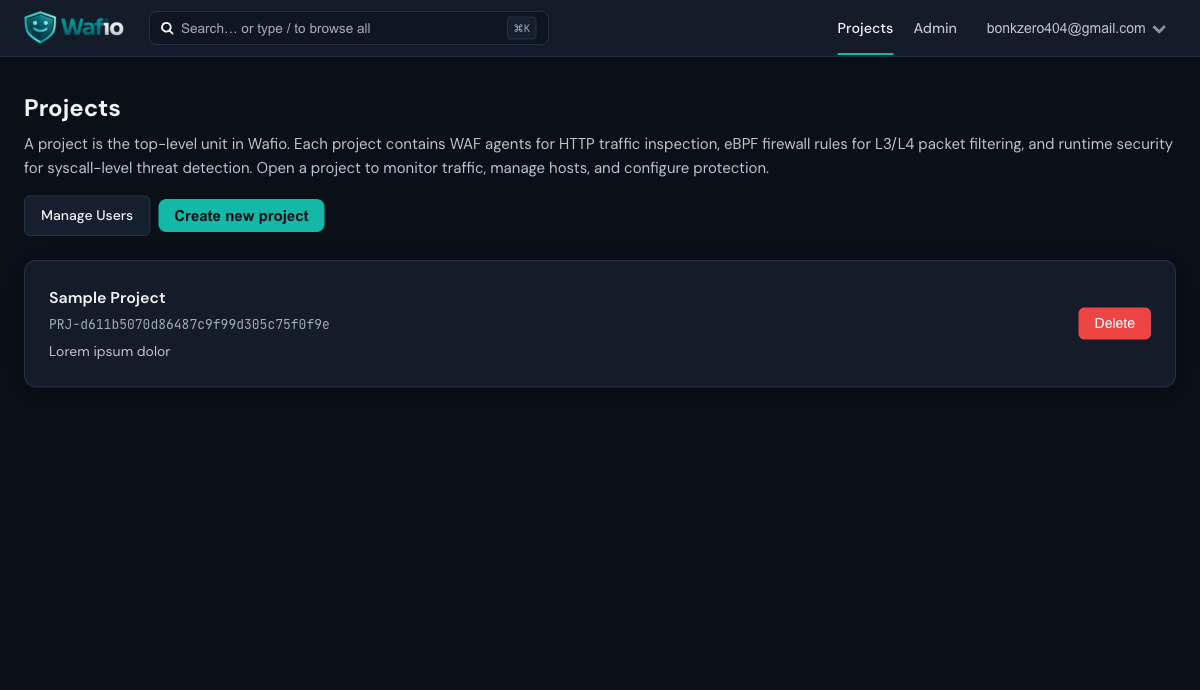
Projects List
The projects list is your starting point. Each project represents an isolated security environment — with its own agents, credentials, WAF rules, and event log.
Project Overview
The Overview is the mission control for one project: WAF decision volume, firewall drops, decision latency, and a "Needs attention" queue covering incidents, heartbeat gaps, pending configuration deliveries, and expiring certificates. A time-series chart breaks requests down by Allow / Block / Monitor, next to top attacker IPs, matched attack categories, source countries, and live host infrastructure.
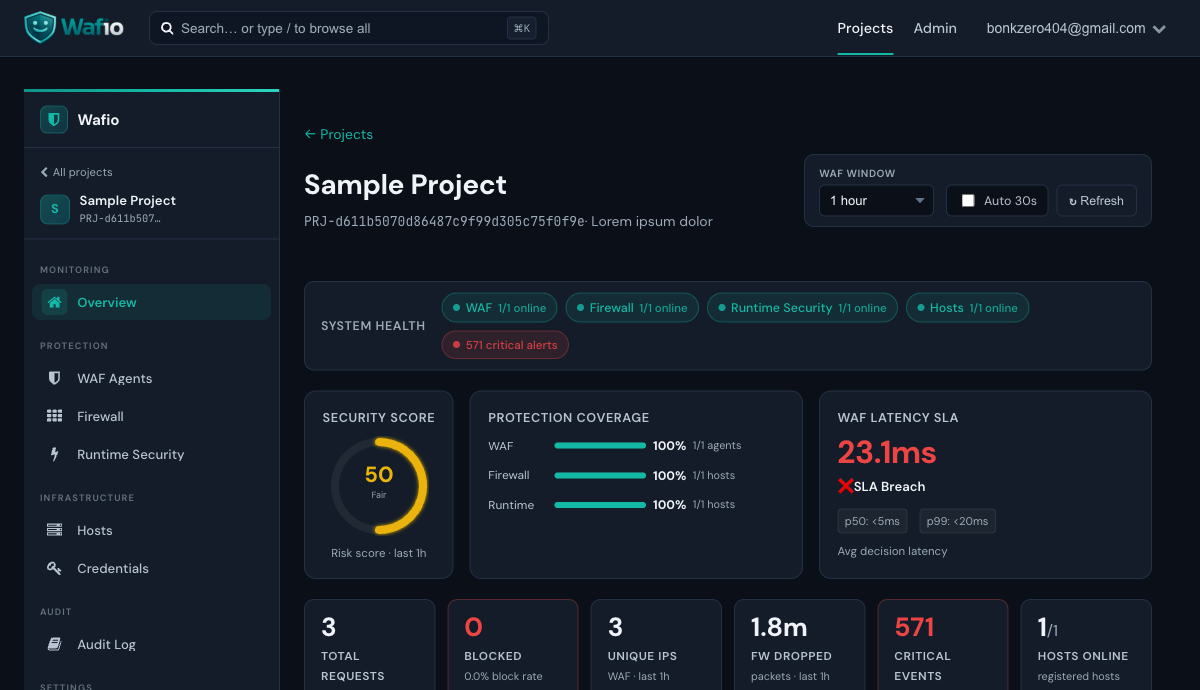
WAF decisions recorded in the selected window (15 min to 1 month), with a per-bucket activity chart.
Requests the detection pipeline scored above the project's block threshold. Drill into full forensic detail from the WAF event log.
Kernel-level L3/L4 packets dropped by the eBPF firewall on your hosts.
Mean inline inspection time per recorded decision.
The project sidebar follows the same order as this tour: Overview, Applications, WAF Agents, Custom Rules, Hosts (with Firewall and Runtime Security), Project Settings, Credentials, Members, and Audit Log. System administrators also reach Administration — users, invitations, security data, email (SMTP), data retention and the global audit log.
Applications
Applications lists every application of the project — its mode (Block or Monitor), the WAF agent that serves it and its route. New application creates one with its listen port and upstream URL; choose a WAF agent to deploy it right away, or save it unassigned. Each application has its own page with Monitoring, Decisions (live), Config (its WAF policy, or inherit the project's), Block window, Routing and Assignment tabs.
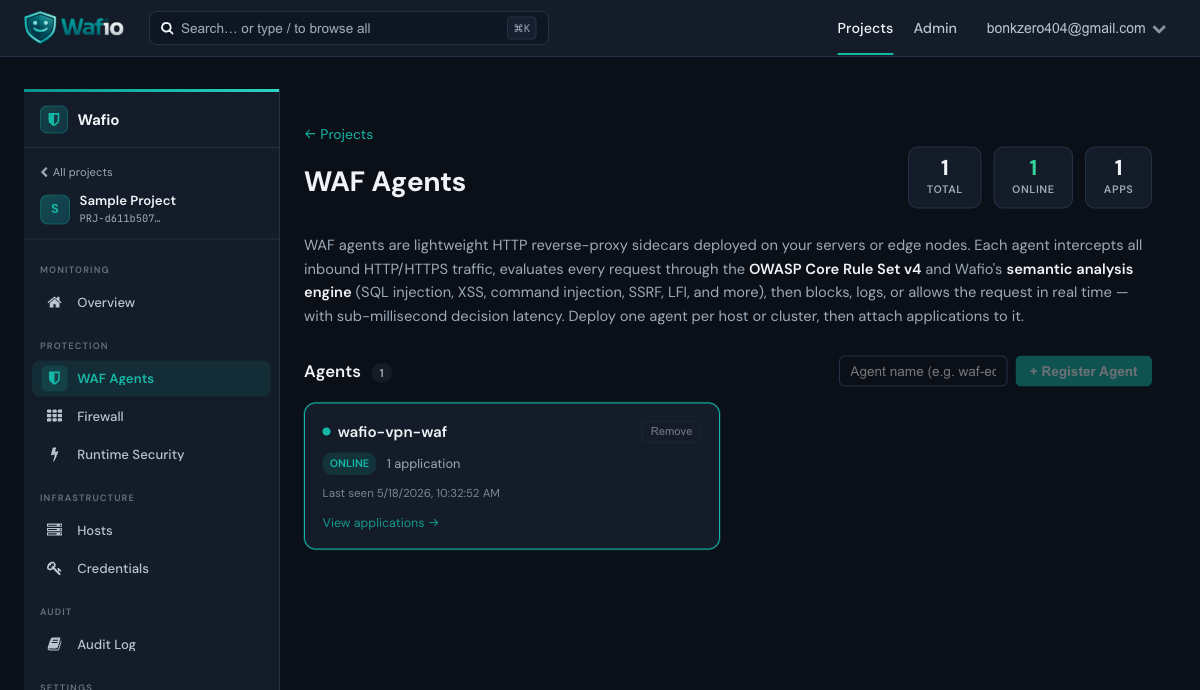
WAF Agents
The WAF Agents page lists every registered agent for this project in an inventory table — online status, protected application count, and last-seen time. Agents register themselves on first connect, or you can register one by name. An agent's page shows its applications, inspection health, SIEM delivery and security data status; the configuration bundle streams to the agent over mTLS gRPC within seconds. No config files on the agent host.
Custom Rules
Custom Rules adds project rules on top of the detection engines. Condition-based rules match request fields and allow, block, log or challenge; only allow and block end inspection, log and challenge record the match and let the pipeline continue. Script rules run in a sandbox with fixed time and memory limits, and only project owners can save or edit them.
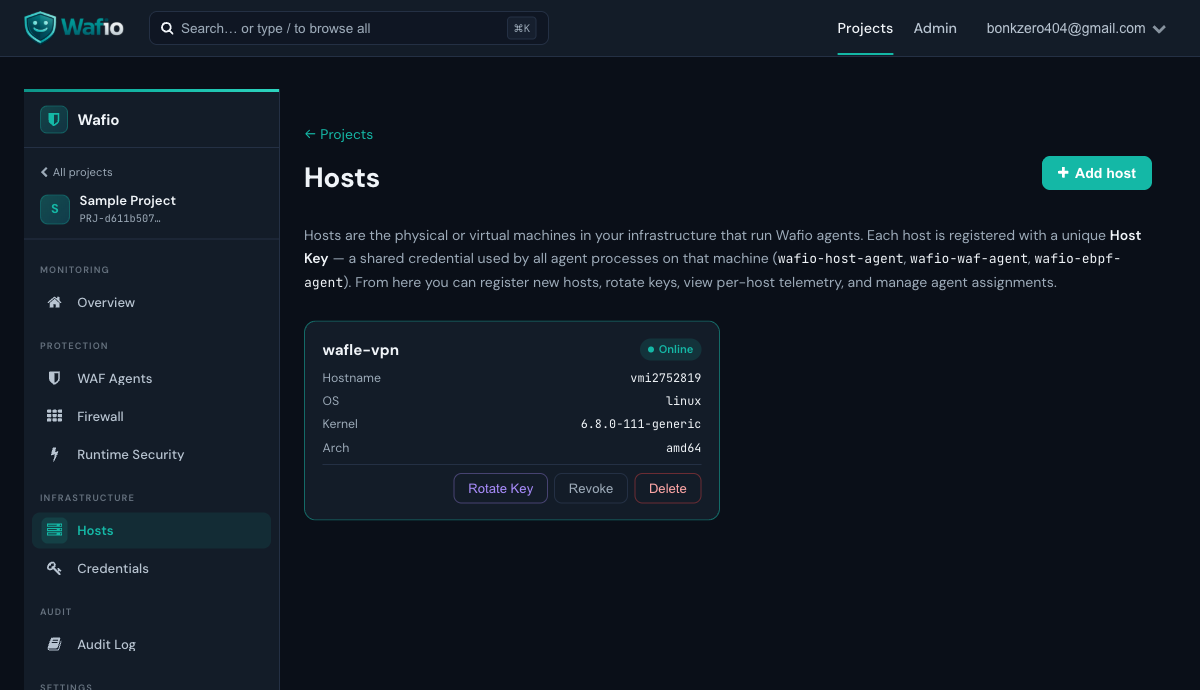
Hosts
The Hosts page is the project's host fleet: one table with each host's status, what protects it (firewall, runtime security), open incidents and agent versions, with filters and labels. Select hosts to edit labels, add or remove a firewall rule, or copy runtime policies and detection rules in one step. Register host shows the host's one-time key inside the Connect this host guide; rotating the key, revoking and deleting live on the host's own page.
Firewall
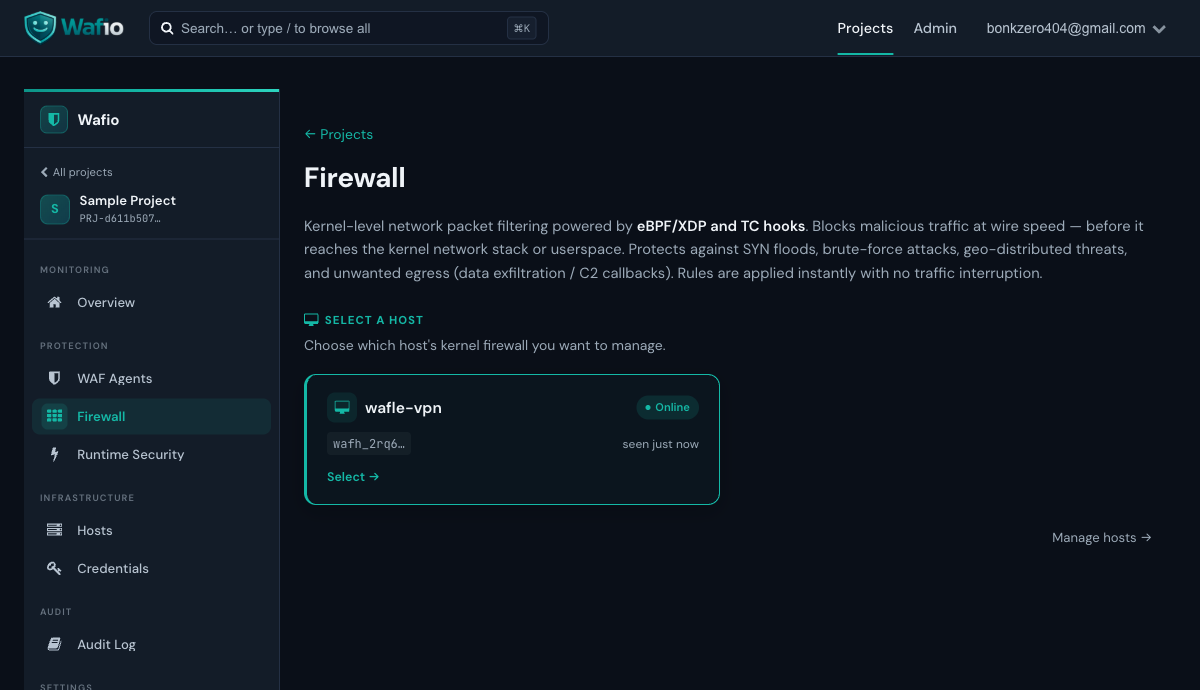
The Firewall page manages the eBPF kernel firewall on each host. Configure inbound/outbound rules, IP allow- and blocklists, country blocking (or allow-only countries), and SYN flood protection, first in monitor-only mode, then enforced. Rules are applied instantly via BPF maps — no iptables, no service restart.
Runtime Security
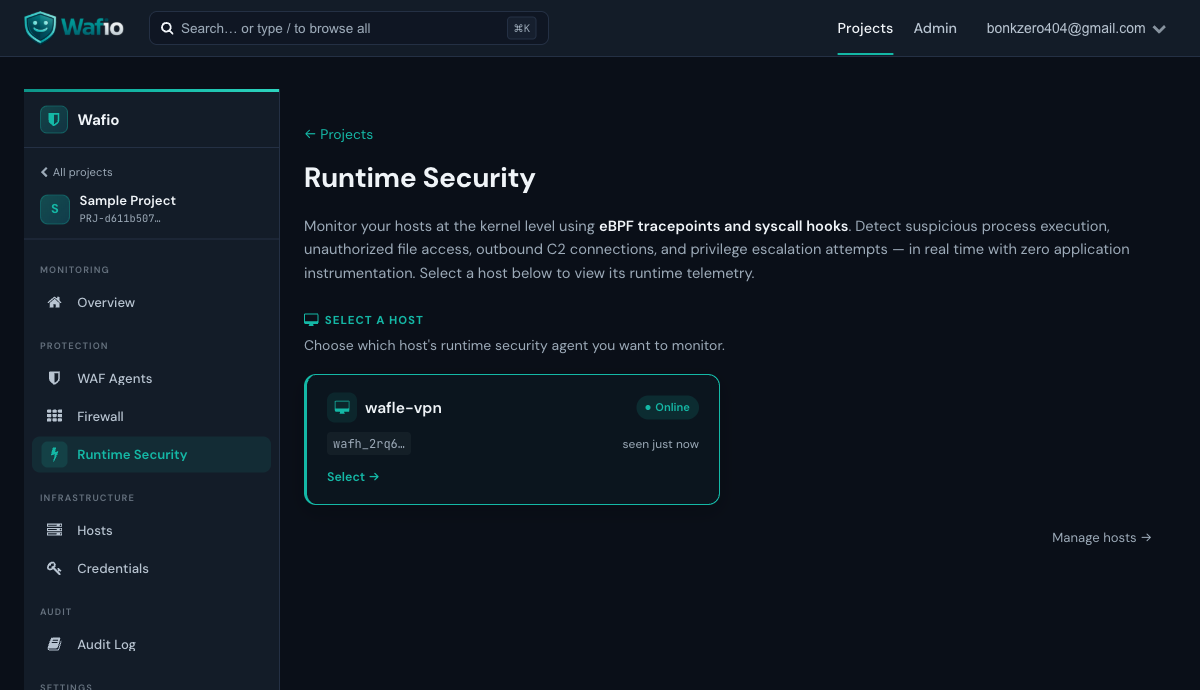
Runtime Security uses eBPF tracepoints to monitor process execution, file access, network connections, and privilege escalation — at the kernel level, with zero application instrumentation. Events are categorized by severity (INFO, LOW, MEDIUM, HIGH, CRITICAL) and grouped into an incident queue mapped to MITRE ATT&CK techniques.
Run the host agent with the --trace flag (the kernel firewall --ebpf flag is on by default, tracing is not). On hardened kernels where kernel.perf_event_paranoid is 4 or higher, lower it — sudo sysctl -w kernel.perf_event_paranoid=1 — or some tracepoints will be skipped at attach time. The status bar shows exactly how many of the capture probes are attached.
Project Settings
Project Settings holds the project details and, in the Default WAF policy tab, the policy every application inherits: protection and advanced scoring (engines, thresholds, semantic engine base scores), access control, bot protection and challenge, rate limits, rule paths, SSRF destinations, uploads and body size, WebSocket, custom responses and SIEM delivery.
Credentials
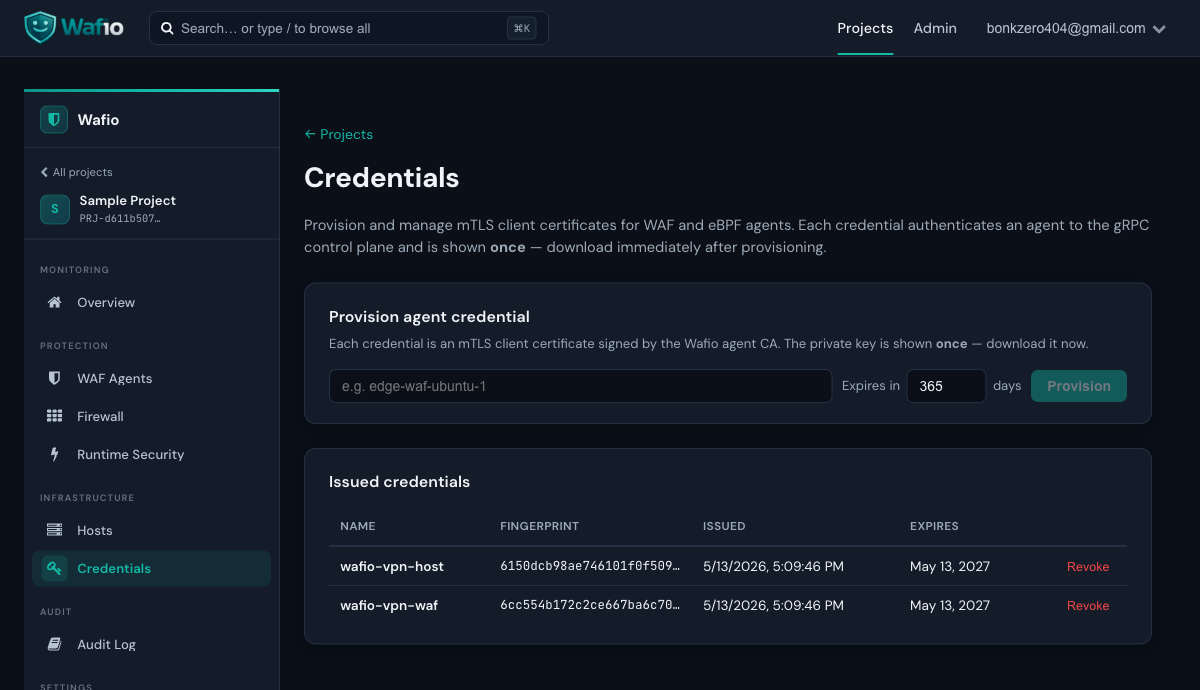
Credentials issues project-wide mTLS client certificates for manual agent installs. The private key is shown once at issue time — download and store it securely. It is never stored on the control plane. Agents installed with the one-command install from Hosts do not need one: they enroll a certificate of their own.
Members
Members invites people to the project and sets their role: viewer (read only), member (configuration and agent changes) or owner (also members, invitations, and deleting projects, applications and hosts). Only owners manage members.
Audit Log
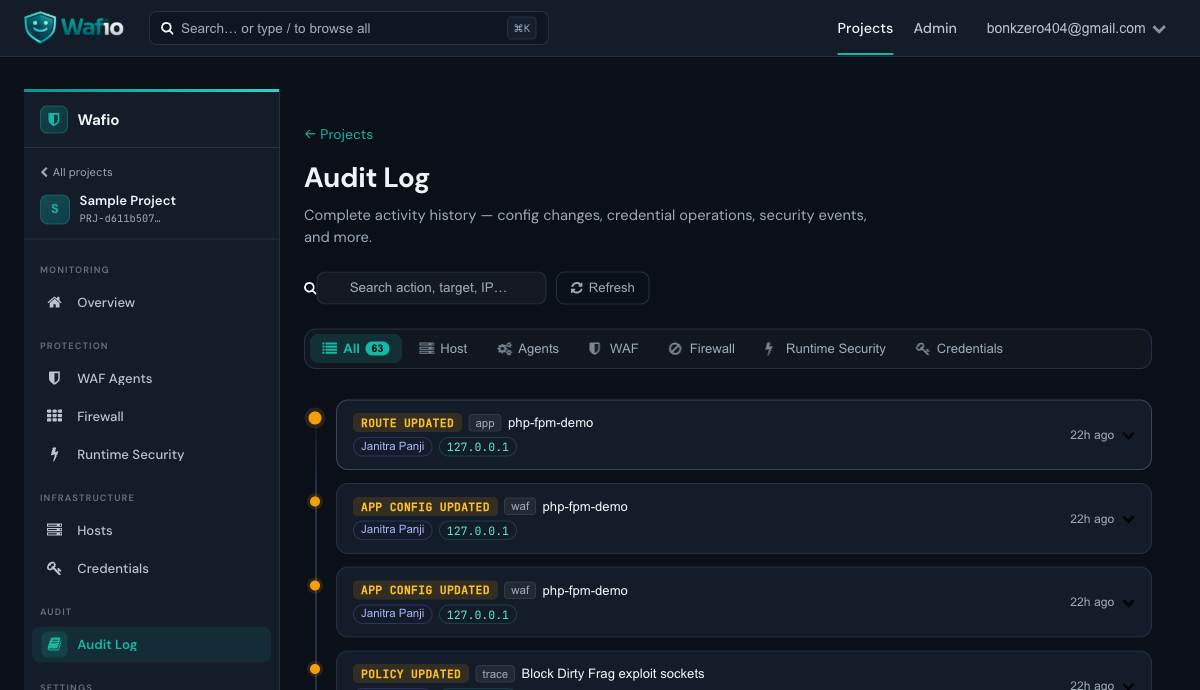
The Audit Log records every action taken by project members: logins, configuration changes, credential provisioning, agent registration, and WAF rule changes. Use it for compliance, incident investigation, and change tracking.
WAF Agent Setup
The WAF agent is a lightweight HTTP reverse-proxy sidecar. Deploy it in front of any HTTP/HTTPS application. It intercepts every request, runs it through the detection pipeline, and either forwards, logs, or blocks it — in under 5ms p99.
Detection Pipeline
Install
Use the one-command install from Hosts › Connect this host with the waf-agent component (see Host Agent Setup), or sudo bash wafio-install.sh waf-agent --bundle credential.tar with a credential from the Credentials page. The installer writes /etc/wafio/waf-agent.env, the certificates under /etc/wafio/certs/, and the systemd unit. Listen ports and upstreams are not set on the agent — they come from the applications you assign to it in the dashboard.
Systemd Service
[Unit]
Description=WAFio WAF Agent
After=network.target

[Service]
Type=notify
EnvironmentFile=/etc/wafio/waf-agent.env
ExecStart=/usr/local/bin/wafio-waf-agent
ExecReload=/bin/kill -USR2 $MAINPID
Restart=on-failure
RestartSec=5s
# Keeps the last applied bundle (last-bundle.json) across restarts
StateDirectory=wafio-waf-agent
StateDirectoryMode=0700

[Install]
WantedBy=multi-user.target
# /etc/wafio/waf-agent.env
WAFIO_GRPC_SERVER=10.1.1.2:9090
WAFIO_GRPC_CA_CERT=/etc/wafio/certs/waf/ca.crt
WAFIO_GRPC_CLIENT_CERT=/etc/wafio/certs/waf/client.crt
WAFIO_GRPC_CLIENT_KEY=/etc/wafio/certs/waf/client.key
WAFIO_AGENT_NAME=waf-prod-01systemctl daemon-reload
systemctl enable --now wafio-waf-agent
systemctl status wafio-waf-agentZero-Downtime Reload
The WAF agent supports graceful restarts via tableflip. Send SIGUSR2 (or systemctl reload wafio-waf-agent) to perform a zero-downtime restart. Supports Type=notify in systemd — sends READY=1 only after the first bundle is applied, either live from the control plane or from the cached last-bundle.json when the control plane is unreachable at start.
Key Environment Variables
| Variable | Required | Description |
|---|---|---|
WAFIO_GRPC_SERVER | Yes | Control plane gRPC address (e.g. 10.1.1.2:9090) |
WAFIO_GRPC_CA_CERT | Yes | Path to the agent CA certificate |
WAFIO_GRPC_CLIENT_CERT | Yes | Path to agent client certificate |
WAFIO_GRPC_CLIENT_KEY | Yes | Path to agent private key |
WAFIO_AGENT_NAME | Yes | Agent name shown in the dashboard. An enrolled certificate accepts only the name it was enrolled with |
WAFIO_GRPC_SERVER_NAME | No | Name in the control plane's gRPC certificate (server.grpc_domain) — needed when WAFIO_GRPC_SERVER is an IP address or another name |
WAFIO_STATE_DIR | No | Directory of the bundle cache; defaults to systemd's StateDirectory |
WAFIO_BUNDLE_CACHE_MAX_AGE | No | Age after which a cached bundle is reported stale (default 168h); it is still served |
WAFIO_BODY_DECODE_BUDGET_BYTES | No | Memory budget for decoding compressed request bodies across the process (default 64 MiB, 0 = off) |
WAFIO_WAF_STORE_MAX_ENTRIES | No | Capacity of each L7 rate-limit and block store (default 100,000, minimum 1,000) |
WAFIO_METRICS_ADDR | No | Opt-in OpenMetrics endpoint GET /metrics on a loopback IP literal, e.g. 127.0.0.1:9100 |
Host Agent Setup
The host agent runs on Linux and provides two capabilities: a kernel-level eBPF firewall (XDP/TC) and runtime security tracing (syscall/tracepoint hooks). It requires root privileges and Linux kernel 5.10+ with BTF enabled.
- Linux kernel 5.10+ with BTF (
CONFIG_DEBUG_INFO_BTF=y); kernels 5.8 and 5.9 are not supported — fully verified on Ubuntu 24.04/26.04 (kernels 6.8 & 7.0) with KVM/virtio_net TSO support - Root privileges (systemd service runs as root)
- Verify BTF:
ls /sys/kernel/btf/vmlinux— file must exist - eBPF objects are CO-RE (Compile Once, Run Everywhere) — no kernel headers needed at deploy time
- Linux amd64 (x86_64) only — host agent does not run on macOS or ARM
Register a Host
- Go to Hosts in your project sidebar
- Click Register host and enter a name
- The Connect this host guide shows the host key once, together with a ready-made install command
- Run that command on the server as root:
curl -fsSL https://wafio.cloud/install.sh -o wafio-install.sh && printf '%s\n' '<host key>' | sudo bash wafio-install.sh host-agent --host-key-stdin \
  --url 'https://<dashboard>' \
  --ca-sha256 '<CA SHA-256>'

# WAF agent on the same host (optional name, default <hostname>@waf)
curl -fsSL https://wafio.cloud/install.sh -o wafio-install.sh && printf '%s\n' '<host key>' | sudo bash wafio-install.sh waf-agent --host-key-stdin \
  --url 'https://<dashboard>' \
  --ca-sha256 '<CA SHA-256>' \
  --agent-name 'web-01@waf'
The installer generates the agent's private key on the server and sends only a certificate signing request, authenticated by the host key, to POST /api/internal/host-enroll. It writes nothing unless the control plane's agent CA matches --ca-sha256. --url must be https:// (http:// only for loopback). The key is piped on stdin so it never shows in ps or sudo's log; without --host-key-stdin the installer asks for it without echo.
A host key enrolls only within 24 hours of the host being created or its key being rotated, each agent once per key. A host holds at most 4 enrolled credentials. To add an agent later or renew a certificate, rotate the key on the host's page and run the new command. Revoking or deleting a host also revokes its enrolled credentials and disconnects its agents.
Manual alternative: issue a project credential on the Credentials page and run sudo bash wafio-install.sh host-agent --bundle credential.tar; the installer then asks for the host key and stores it as WAFIO_HOST_KEY in /etc/wafio/host-agent.env.
Systemd Service
The installer writes this unit (interface and paths filled in for your server):
[Unit]
Description=WAFio Host Agent (eBPF)
After=network.target

[Service]
Type=simple
EnvironmentFile=/etc/wafio/host-agent.env
ExecStart=/usr/local/bin/wafio-host-agent \
  --interface=eth0 \
  --geoip-db=/opt/wafio/security-data/geoip/country.mmdb \
  --xdp-obj=/opt/wafio/ebpf/wafio_xdp.o \
  --tc-obj=/opt/wafio/ebpf/wafio_tc.o \
  --trace-obj=/opt/wafio/ebpf/wafio_trace.o \
  --ebpf \
  --trace
Restart=on-failure
RestartSec=5s

[Install]
WantedBy=multi-user.target
# /etc/wafio/host-agent.env
WAFIO_GRPC_SERVER=cp.example.com:9090
WAFIO_GRPC_CA_CERT=/etc/wafio/certs/host/ca.crt
WAFIO_GRPC_CLIENT_CERT=/etc/wafio/certs/host/client.crt
WAFIO_GRPC_CLIENT_KEY=/etc/wafio/certs/host/client.key
WAFIO_AGENT_NAME=web-01@ebpfWhat the Host Agent Monitors
Every execve with full command line, parent/grandparent, UID, cgroup, and container context.
Opens to sensitive paths (/etc/passwd, /proc/, web shells) with read/write flags.
Outbound TCP connections — detect C2 callbacks, reverse shells, and data exfiltration.
setuid/setgid, capability grants, and container namespace escapes detected at syscall level.
Container Enrichment
The host agent polls Docker/containerd sockets every 10 seconds to map cgroup IDs → container metadata (image, name, labels, Kubernetes pod/namespace). All trace events from containers are automatically tagged with this context. Degrades gracefully if no Docker socket is present.
Credentials (mTLS)
Every agent authenticates to the control plane using a mutual TLS client certificate signed by the control plane's own internal agent CA — no public CA involved. The certificate's fingerprint maps the agent to its project.
Two Kinds of Credentials
| Credential | How it is made | Bound to |
|---|---|---|
| Enrolled (recommended) | One-command install from Hosts › Connect this host: the private key is generated on the host, the control plane signs its CSR (valid 365 days). Only the certificate and its fingerprint are stored. | One host, agent kind (host or WAF) and agent name |
| Project-wide | Issued on the Credentials page; the private key is generated by the control plane and shown once. | The project — the agent may connect under any name |
Issuing a Project Credential
- Navigate to Credentials in your project
- Enter a descriptive name (e.g.
waf-prod-edgeorhost-vpn-server) - Set the validity in days (default: 365)
- Click Issue credential
- The dialog shows the one-time credential bundle — copy or download it immediately, then pass it to the installer with
--bundle
Credential Bundle Contents
| File | Description |
|---|---|
ca.crt | Agent CA certificate — used by the agent to verify the control plane's identity |
client.crt | Agent's client certificate — presented to the control plane during TLS handshake |
client.key | Agent's private key — shown once, never stored on the server |
The private key (client.key) is never stored on the control plane. If you lose it, revoke the credential and provision a new one. Revocation takes effect within seconds — the agent will disconnect immediately.
Revoking a Credential
Click Revoke next to any issued credential. The agent loses its connection within seconds. Revocation is immediate and permanent — issue a new credential to reconnect. Enrolled credentials are revoked with their host: revoking or deleting a host deletes them and closes their agents' connections.
Firewall
The WAFio firewall operates at the kernel level using eBPF XDP and TC hooks. It processes packets before they reach the kernel's network stack — orders of magnitude faster than iptables or nftables.
Firewall Rule Types
| Rule Type | Description |
|---|---|
| IP Blocklist | Drop all traffic from specific IPv4/IPv6 addresses, CIDR prefixes or ranges |
| IP Allowlist | Always pass traffic from trusted sources, ahead of blocks. An entry can be limited to TCP/UDP ports (up to 8 port scopes; needs an agent that reports the allowlist_ports feature) |
| Country Rules | GeoIP-based: block mode drops traffic from listed countries; allow mode drops every public source outside the listed countries (needs conntrack and an explicit confirmation) |
| Port Rules | Block or allow specific TCP/UDP ports, or Deny All inbound with explicit allows |
| SYN Flood Protection | Rate-limit new TCP connections per source IP |
| Port Scan Detection | Detect sources probing many ports |
| Egress Control | Block outbound connections to specific IPs/ports, or Deny All egress (C2 callback prevention) |
Rule Application
Rules are pushed to the agent as BPF map updates — they take effect instantly with no traffic interruption. No agent restart needed. Changes reflect in the dashboard within 1–2 seconds. The agent keeps the last good state on disk and re-applies it after a restart.
Lockout Protection
Before a rule set is applied, the control plane and the agent check that it cannot lock you out: inbound Deny All needs a permanent TCP allow on a reported SSH port, egress Deny All and family-wide blocks need connection tracking, and a wildcard block needs a lockout-escape allowlist entry. A refused rule set is shown on the host with its reason; nothing is applied.
Enforcement Modes
| Mode | Behavior |
|---|---|
| Monitor | Monitor-only — matching packets are counted as would-drop and logged, every packet is forwarded |
| Enforce | Matching packets are dropped in the kernel |
Runtime Security
Runtime security uses eBPF tracepoints to hook into kernel syscalls — detecting suspicious behavior at the source rather than relying on log-based detection after the fact.
Detection Rules
WAFio ships with built-in detection rules seeded at project creation. Built-in rules cannot be deleted (only disabled). Custom rules can be added, updated, or deleted by project members (member role or higher). Each rule has ordered AND-ed conditions and an action:
| Action | Effect |
|---|---|
suppress | Drop the event — reduce noise from known-good processes |
escalate | Raise event severity — force attention to high-value events |
downgrade | Lower severity — tune noisy rules without disabling them |
tag | Add a label to the event — useful for SIEM correlation |
Condition Fields
Rules can match on: comm, parent_comm, grandparent_comm, event_name, category, severity, filename, addr, port, uid, gid, addr_family, flags, detail, is_container, exe_verified, container_image, container_name.
Supported operators: eq, neq, in, not_in, contains, starts_with, glob, gte, lte, and the bit tests bit_and / bit_none on flags and detail.
Process names (comm and its parents) are chosen by the process itself. exe_verified is set in the kernel only for processes the agent verified as the real binary, so a rule that drops events should require it; built-in suppress rules that name a process do.
Example: Suppress Noisy Docker Events
conditions:
  - field: comm
    op: eq
    value: containerd-shim
action: suppress
Enforcement Policies
Besides detection rules, runtime policies decide what happens when a traced event matches:
| Action | Behavior |
|---|---|
| Monitor | Record only |
| Alert | Record and raise an alert to the control plane |
| Simulate | Record as if enforced, without acting |
| Block | Deny the operation in the kernel through LSM hooks (blocklisted connects and sends) |
| Kill | SIGKILL the matching process through a verified pidfd; never protected system processes such as PID 1, sshd or systemd |
A Kill policy that does not narrow its match (by process, path or destination) needs an explicit confirmation in the dashboard before it is enforced.
SIEM Export
WAF BLOCK and LOG decisions can be sent as JSON to a webhook for your SIEM or log collector. Configure it in the WAF policy (Project Settings › Default WAF policy › SIEM delivery, or per application); each WAF agent's page shows the delivery status.
Detection Engine
WAFio combines semantic analysis with Coraza/CRS detection. Semantic evidence can block early; by default CRS is skipped for a request the semantic stage found clean and inspected completely. Otherwise, WAFio evaluates the rule signals with sensitivity filtering and configured thresholds. Explore the illustrated semantic scanning guide and pipeline →
Layer 1: Semantic Engine (20 Analyzers)
Twenty language-specific and structural analyzers use a mix of parsers, tokenization, heuristics and pattern checks. They inspect supported normalized input, with pre-filters and bounded engine concurrency. Not every engine uses an AST, and coverage depends on the input and enabled policies.
| Analyzer | Detects | Key techniques |
|---|---|---|
| SQL | SQL injection | Full SQL AST parsing, UNION, subqueries, boolean blinds, versioned comments (/*!50000*/) |
| XSS | Cross-site scripting | HTML/JS parser, event handler analysis, CRLF evasion, entity decode chains, protocol obfuscation |
| CMD | OS command injection | Shell metacharacter detection, $IFS expansion, ANSI-C octal escapes, backtick/process substitution |
| Prompt Injection | LLM / AI application jailbreaks | System prompt overrides, roleplay escaping, delimiter/tag hijacking, markdown/exfil injections |
| Open Redirect | Unvalidated redirects & phishing relays | Protocol smuggling, URL schema bypass (//, /\, javascript:), SSRF evasion chains |
| LFI | Local file inclusion / path traversal | ../ patterns, null bytes, encoded variants, Windows 8.3 short names |
| SSRF | Server-side request forgery | RFC-1918 targets, cloud metadata endpoints (169.254.169.254), IPv6 translation addresses |
| Java | Java deserialization, SpEL/OGNL, Log4Shell | Recursive Log4j lookup unfold, nested obfuscation, JNDI protocol variants |
| PHP | PHP code injection, wrapper abuse | php://, data://, dangerous function detection, string concat eval |
| Python | Python code / template injection | eval/exec, os.system, __class__.__mro__ gadget chains, pickle opcodes |
| NoSQL | NoSQL injection | MongoDB operator injection ($where, $ne, $gt), JS expression injection, JSON-encoded operator smuggling |
| LDAP | LDAP injection | Filter metacharacter injection, blind boolean filters, wildcard / null-byte abuse in DN and search filters |
| SSTI | Server-side template injection | Jinja2 / Twig / Freemarker / Velocity expression syntax, sandbox-escape gadgets, arithmetic probes |
| XXE | XML external entity | External / parameter entity declarations, SYSTEM / PUBLIC DTDs, OOB exfil, billion-laughs expansion |
| Deser | Insecure deserialization | Java serialized streams (rO0 / ac ed), PHP O:/a: objects, Python pickle, .NET / YAML gadget markers |
| Proto Pollution | Prototype pollution | __proto__ / constructor / prototype key injection in JSON and query/body params |
| Header Injection | CRLF / response splitting (LOG tier) | Encoded and raw CR/LF sequences that would start new headers |
| GraphQL | GraphQL abuse (LOG tier, default base score 120) | Introspection queries, batch abuse |
| JWT | Forged tokens (block tier, default base score 200) | alg: none, kid path traversal |
| Anomaly | Adversarial mutation & grammar anomalies | Double encoding, Unicode normalization abuses, multi-delimiter collisions, AST token smudging |
Layer 2: OWASP CRS v4
Coraza runs OWASP Core Rule Set v4 in DetectionOnly mode — it never blocks directly. Matched rule IDs are fed into the Decision Engine, the sole arbiter of ALLOW, LOG and BLOCK. With semantic_policies.skip_coraza_when_clean: true (default), CRS is skipped when every semantic engine is clean and coverage was complete; if any part was not fully inspected (oversized or truncated values, field caps, binary bodies, a disabled engine), CRS runs and the decision records the coverage gap. CRS can also be switched off per project or path (semantic only); a request left partly uninspected then becomes LOG rather than a clean ALLOW.
Decision Engine
For each matched CRS rule, the Decision Engine looks up its RuleMeta: attack category, base score, sensitivity level, and confidence multiplier. Rules above the project's sensitivity threshold are silently dropped. Remaining scores are summed:
total_score = Σ (base_score × confidence) for each matched rule

if total_score >= block_threshold  → BLOCK
if total_score >= log_threshold    → LOG
else                               → ALLOW
The default thresholds are block: 150 and log: 80. If both the semantic engine and CRS agree on the same attack category, the score is elevated via cross-engine boost.
Sensitivity Levels
| Level | Value | Use Case |
|---|---|---|
| Safe | 1 | Only high-confidence rules fire. Lowest FP rate. Good for APIs and tightly-typed endpoints. |
| Balanced | 2 | Default. Good balance for most web applications. |
| Aggressive | 3 | High sensitivity — more detections, more potential false positives. Useful in honeypot/research mode. |
Tuning False Positives
- Lower the project sensitivity level (Aggressive → Balanced → Safe)
- Raise
thresholds.blockin the project WAF policy - Add path exceptions for known-safe routes (health checks, webhooks)
- Keep
semantic_policies.skip_coraza_when_clean: true(default) so CRS noise is skipped when the semantic engines find nothing - Lower a semantic engine's
base_score(0 disables it) under Protection › Advanced scoring › Semantic engines - Bump individual CRS rule
Sensitivityto 3 for known-noisy rules indecision.go
Configuration Reference
Configuration is loaded in priority order: config/config.yaml → WAFIO_* environment variables → CLI flags. Every YAML key maps to an env var: server.http_addr → WAFIO_SERVER_HTTP_ADDR.
Required Settings
| Key | Env Var | Description |
|---|---|---|
database.name | WAFIO_DATABASE_NAME | PostgreSQL database name — server refuses to start if empty |
jwt.secret | WAFIO_JWT_SECRET | At least 32 characters. Boot is refused if it is empty or still the placeholder from the example config — in every environment, not only production |
totp.enc_key | WAFIO_TOTP_ENC_KEY | Encrypts 2FA secrets at rest. Mandatory, and must decode to exactly 32 bytes: openssl rand -hex 32 |
database.max_conns | WAFIO_DATABASE_MAX_CONNS | Shared pool size, default 20. One pool serves decision ingest, dashboard queries, auth and the host paths, so the driver default of max(4, NumCPU) lets a burst of WAF traffic starve the dashboard. Keep the sum across every process pointed at one database below its max_connections |
database.min_conns | WAFIO_DATABASE_MIN_CONNS | Connections kept warm, default 2 |
Hot-Reload vs Restart Required
| Setting group | Reload behavior |
|---|---|
server.*, database.*, jwt.*, crs.*, log.level | Restart required — wired at boot |
smtp.*, server.base_url | Read at boot; when set they win over the dashboard (a non-empty smtp.host makes the whole mail server config-managed) |
| Administration › Email (SMTP) | Used when smtp.host is empty — applied live, no restart (the password is stored encrypted and never shown again) |
| Administration › Data retention | Retention per table and the database size budget — applied live, no restart |
| Project WAF rules JSON | Pushed to agents via gRPC automatically — no restart |
Common Settings
server:
  http_addr: ":9087"              # HTTP listen address (dashboard + API)
  agent_grpc_addr: "0.0.0.0:9090" # gRPC mTLS listen address for agents
  grpc_domain: "cp.example.com"   # name in the gRPC server certificate
  base_url: "https://cp.example.com"  # absolute link base for emails
  env: production                 # "development" or "production"
  trusted_proxies: ["127.0.0.1", "::1"]  # reverse proxies whose header is trusted (empty = none)
  proxy_header: X-Forwarded-For   # or X-Real-IP
  agent_recv_account_mib_per_sec: 64   # agent data taken in per account, MiB/s (0 = default)
  agent_recv_total_mib_per_sec: 128    # all accounts together, shared fairly (0 = default)

database:
  host: localhost
  port: 5432
  name: wafio
  user: wafio
  password: secret                # raw, never percent-encoded
  max_conns: 20
  statement_timeout_ms: 15000     # 0 = off, else 1000–600000

jwt:
  secret: "output-of-openssl-rand-hex-32"
  expire_hours: 72

totp:
  enc_key: "output-of-openssl-rand-hex-32"

log:
  level: info                     # debug | info | warn | error

smtp:                             # optional; or Administration › Email (SMTP)
  host: smtp.example.com
  port: 587
  encryption: starttls            # auto | starttls | ssl | none
  username: noreply@example.com
  password: smtp-password
  from: "Wafio <noreply@example.com>"

crs:
  default_dir: security-data/crs
Behind a reverse proxy on the same host, set trusted_proxies as above and have the proxy send X-Forwarded-For $proxy_add_x_forwarded_for (or X-Real-IP $remote_addr with proxy_header: X-Real-IP); otherwise every client appears as 127.0.0.1 to login lockout, rate limits and the audit log.
Metrics
Set WAFIO_METRICS_ADDR=127.0.0.1:9100 (a loopback IP literal; anything else stops the process at start) on the control plane, the WAF agent or the host agent to serve OpenMetrics at GET /metrics on a separate listener. The control plane also reports database size and retention (wafio_db_size_bytes, wafio_db_size_alert_level, wafio_retention_days, …) and the agent receive budget (wafio_agent_recv_*).
WAF Project Config (per-project JSON)
Each project stores its WAF policy as rules_json (edited in Project Settings › Default WAF policy); an application's own policy of {} inherits the project's. Any key left out takes its default — omitting a key never turns a detector off; only disabled: true or base_score: 0 does. The rule sensitivity level (Safe / Balanced / Aggressive) is a separate project setting.
{"thresholds": {"block": 150, "log": 80},
  "semantic_policies": {
    "skip_coraza_when_clean": true,
    "scan_all_headers": true,
    "jwt": {"base_score": 200},
    "graphql": {"base_score": 120}
  },
  "geo": {"block_countries": [], "allow_countries": []},
  "bot_protection": {"enabled": false, "mode": "off"},
  "l7_flood": {"enabled": true, "window_sec": 60, "max_requests": 500},
  "request_body_limit": "5M"
}Upstream Timeouts
Each application's proxy timeouts are set from the dashboard, on the WAF Agent and Application pages. They read as three states:
| Value | Meaning |
|---|---|
0 | Not set — the built-in default applies |
-1 | Unlimited — no deadline is imposed. Shown as an Unlimited checkbox in the dashboard |
above 0 | Milliseconds |
The upstream timeout applies to both HTTP and FastCGI upstreams. Earlier versions applied the configured value only to HTTP; PHP-FPM routes used a fixed 30-second deadline that no setting could change, so requests taking between 30 seconds and whatever the front-end proxy allowed failed through WAFio and succeeded when addressed directly.
Only the deadline on the backend's response. A request that never finishes holds the connection — and the PHP-FPM worker behind it — until the backend answers or the client gives up. Dial, connection-pool wait and idle timeouts stay bounded; those protect WAFio's own resources rather than the backend's working time.
Prefer a finite value just under whatever your front-end proxy allows, and give the backend a limit of its own (request_terminate_timeout for PHP-FPM). Unlimited turns an error at 30 seconds into a request that hangs instead — sometimes what you want, sometimes worse.
Signed Releases
Every WAFio release bundle on wafio.cloud carries an Ed25519 signature. install.sh checks the SHA-256 from the manifest and then the signature against the release public key built into the installer, and refuses to install a bundle that is unsigned, signed by another key, or whose manifest names a different public key.
A checksum alone proves the bytes arrived intact but says nothing about where they came from: whoever controls the download could serve any binary together with a perfectly correct hash. The signature closes that gap. The signed payload binds the version to the bundle hash, so a valid signature for an older release cannot be passed off as a newer one.
Agents do not update themselves — there is no self-update path. Upgrade any server by re-running the installer (see Upgrading an Existing Install), which applies the same checks.
GET /api/download/<component>/sig returns the version, SHA-256, signature and public key of a bundle. The signed payload is wafio-release-v1, the version and the SHA-256, each on its own line.
Downloads
WAFio is free to download from the wafio.cloud portal — no account, signup, or API key required. Every download is recorded anonymously (component, version, and network metadata) for release analytics; no personal data is collected.
Download Endpoints
| Endpoint | Auth | Description |
|---|---|---|
GET /api/download/manifest | None | Returns latest.json with version and SHA-256 checksums for all bundles |
GET /api/download/controlplane | None | Download control plane bundle (garble-obfuscated, amd64) |
GET /api/download/waf-agent | None | Download WAF agent bundle (garble-obfuscated, amd64) |
GET /api/download/host-agent | None | Download host agent bundle (garble-obfuscated, amd64) |
GET /api/download/<component>/sig | None | Ed25519 release signature, version, SHA-256 and public key of a bundle |
GET /api/download/<component>/sbom | None | SPDX JSON software bill of materials of a bundle, when published |
Using the API
# Check current version and checksums
curl -s https://wafio.cloud/api/download/manifest | python3 -m json.tool

# Download WAF agent bundle (no key needed)
curl -fsSL "https://wafio.cloud/api/download/waf-agent" -o wafio-waf-agent.tar.gz

# Verify checksum
EXPECTED=$(curl -s https://wafio.cloud/api/download/manifest \
  | python3 -c "import sys,json; print(json.load(sys.stdin)['bundles']['waf-agent']['sha256'])")
echo "$EXPECTED  wafio-waf-agent.tar.gz" | sha256sum -c
Bundle Contents
Each bundle is a .tar.gz archive containing the binary and an install.sh helper script; the control plane bundle also carries the dashboard (frontend/) and the database migrations/, the host agent bundle the CO-RE eBPF objects. Binaries are built with garble obfuscation (-literals -seed=random) for distribution — symbol names, package paths, and string literals are obfuscated in every release.
Error Responses
| HTTP Status | Condition |
|---|---|
400 | Unknown component name (must be controlplane, waf-agent, or host-agent) |
503 | Bundle not yet uploaded — check manifest for current version |